I can help you receive your text code and log in to your account successfully, @qsedev-testdrive5.
Let's start by rebooting your phone and checking your network signal. If the issue persists, I suggest using your email address to receive the code.
You can click the Sign in a different way link or choose Email a code. This way, you will receive a new text code by your email address and use it to log in to your QuickBooks Self-Employed account.
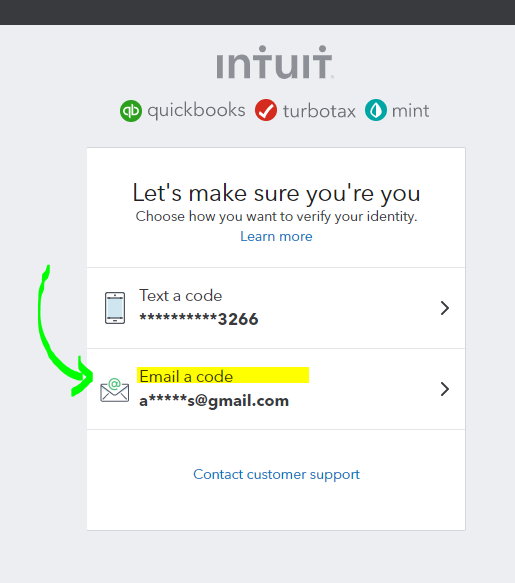
However, if the same thing happens, I recommend contacting our QuickBooks Self-Employed Support team to investigate this issue. Our representatives can pull up your account and verify if the code went out. Since you can't access it, you'll want to use this direct chat link to reach out to them: QuickBooks Self-Employed Direct Chat link.
Our support agents are available from Monday to Friday, 6 AM to 6 PM Pacific Time.
After finding out the issue and fixing it, you can start working on your Self-Employed account. If you need help categorizing your transactions, you can check this article: Categorize transactions in QuickBooks Self-Employed.
You can add any details below if you need further assistance with your account. I'm always here to help you.




