We have several workarounds and troubleshooting steps to fix the taxable amount in the Sales Tax Liability report, PunkyQ. I have these handy steps ready for you.
Here's how:
- Open the Sales Receipt transaction.
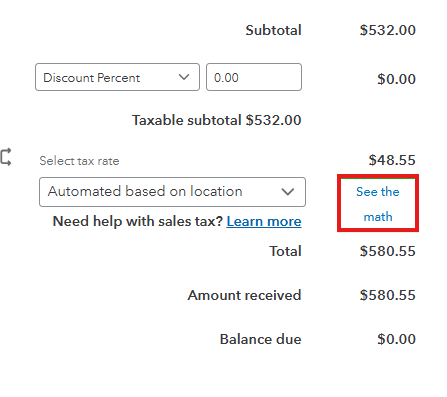
- Click the See the math to recalculate the sales tax.
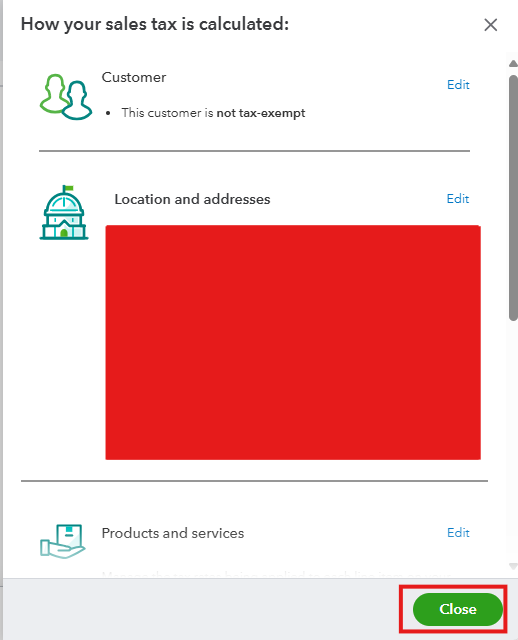
- Click Close, then select Save.
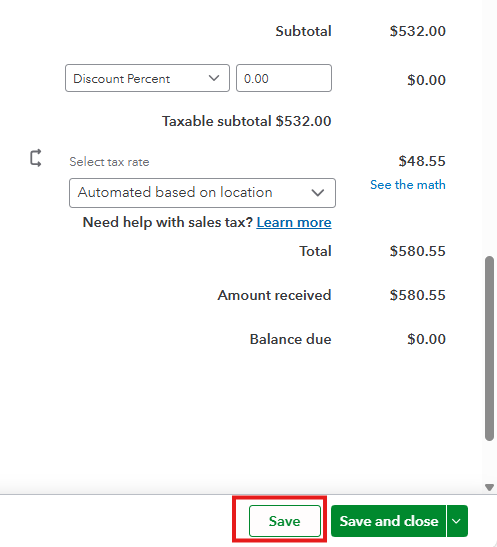
It allows QuickBooks to recalculate the sales tax and should fix the reports for the transaction affected. If the Sales Tax Liability report still shows no changes, we can access it through a different supported browser.
You can use either of the supported web browsers that are available on your computer:
- Google Chrome: version 78 or newer
- Mozilla Firefox: version 76 or newer.
- Microsoft Edge: version 79 or newer
- Safari: version 12 or newer (Mac only)
- Opera: version 68 or newer
- Samsung: version 10 or newer
In addition, you can also use a private window or incognito tab. Here are the keyboard shortcuts for opening them:
- Google Chrome: Ctrl + Shift + N
- Microsoft Edge: Ctrl + Shift + N
- Safari: Command + Shift + N
- Mozilla Firefox: Ctrl + Shift + P
After completing the troubleshooting steps above and the issue persists, I suggest contacting our Live Support Team to assist you further with the necessary next steps.
Here's how to connect with them:
- Navigate to the Help menu.
- Click the Search option, and type "contact support".
- Select the Contact Us tab at the bottom.
- Enter the question, keyword, or topic you need help with.
- Follow the prompts, then choose a way to connect with us.
Furthermore, I'll add some helpful articles for you to help you manage your sales tax and sales receipt:
It's a pleasure to work with you, PunkyQ. If you need further help managing your sales receipt and sales tax, please don't hesitate to drop them below. Have a nice day!



