Turn on suggestions
Auto-suggest helps you quickly narrow down your search results by suggesting possible matches as you type.
Showing results for
Get 50% OFF QuickBooks for 3 months*
Buy nowSuddenly, I have a lot of extra transactions showing up in a clearing account for Shopify. My balance sheet now shows a balance of over $80,000 in my "Other Payment Gateway Clearing Account." I was in the process of fixing some transactions related to this clearing account. The first date transactions were previously posted to that account was on 06/12/2024. * On 7/7/2025 when I pulled the balance sheet for 6/30/2024, I had it zeroed out. I had some transactions in that account to fix starting with transaction date 7/1/2024, and I had a plan. *On 7/9/2025, I emailed someone and told them I had it zeroed out and correct. *On 7/14, I had a meeting with that person and it was off. Now I see I have a lot of new Sales Receipt transactions posted. They make no sense to me. Example: I just found a Sales Receipt dated 1/19/2024 that was added by the system administrator on 7/8/2025. Dollar amounts are $804 sales, $4 discount, net deposit $800. *I have searched Shopify for order dates around 1/19/24, and nothing matches. *I also do not have any orders that would add up to that amount on or around 1/19/2024. I then searched orders for total order amount of $800 and $804 for all dates, and nothing matches. *I have no idea what these orders are for and wonder if they are even for my company...? When I started searching the QuickBooks help sections, I ran across this article: "Understand changes to eCommerce app integrations." It shows it was updated 3 weeks ago, but I don't know the original date. "Starting May 1 and through June 30, we’ll begin moving the apps listed below from the current apps integration tool, OneSaas, to QuickBooks. We'll notify you via email when your app is ready to move and will provide instructions on what to do. Amazon BigCommerce eBay Etsy Shopify ************ Squarespace Wix WooCommerce" Questions: 1) Could this be related to my issue? I think I have a lot of transactions to void or delete! :-(( 2) Does anyone have any suggestions why this happened? If I inadvertently did something, I want to make sure I NEVER do it again. Thank you
QuickBooks Online (QBO) relies on the data being entered or fed into the system. The QuickBooks Help article that you're referring to only provides information which apps will be migrated to QuickBooks and doesn't relate anything on your issue, Janel.
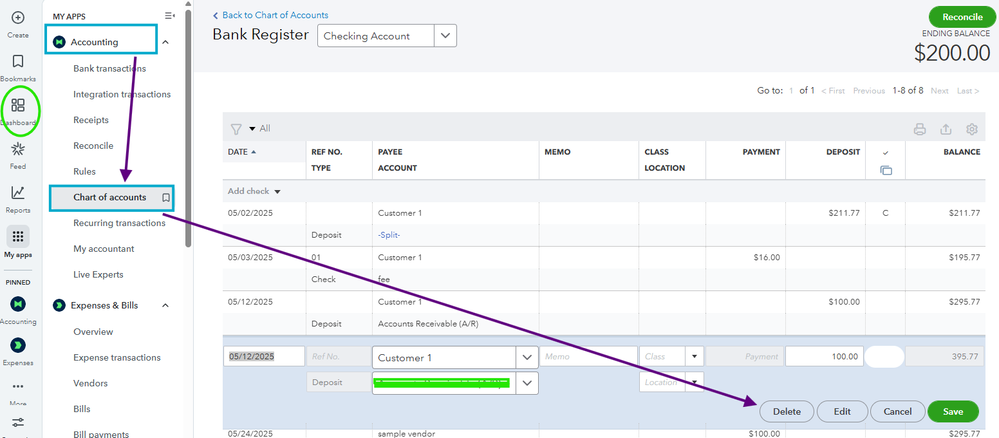
You can manually delete the transactions from your chart of accounts if transactions showing are not valid. To do so, follow the steps below:
On the other hand, any changes made by the System Administration occur when you're connected to a third-party app. These changes take effect when the app sends data to QuickBooks, potentially modifying your existing data.
Additionally, you may also want to reach out to Shopify support team to confirm if any syncing issues have been reported and to get guidance on how to address them effectively.
It is important to familiarize the synchronization options available in the configuration settings. read this article for reference: Shopify and QuickBooks Online Integration Guide.
Feel free to inform me if you have any other queries or questions with integrations. I'm always right here to help you all the time.
You have clicked a link to a site outside of the QuickBooks or ProFile Communities. By clicking "Continue", you will leave the community and be taken to that site instead.
For more information visit our Security Center or to report suspicious websites you can contact us here