It's possible, grodgers27.
The beginning balance in QuickBooks should match your bank statement for the same start day. Compare the opening balance of the account you are reconciling with your real bank account before making any changes. Then, you can follow these steps to fix or change it.
Here's how:
- Go to the Accounting menu, then select Chart of Accounts.
- Find the account on the list.
- Select View register.
- Search for the opening balance entry. It should have "Opening Balance Equity" in the Account column.
- Take note of the date and balance.
- Next, you need to compare the opening balance with your real-life account.
- Check the account's balance for the same day as the opening balance in QuickBooks.
- Click the opening balance entry to expand and edit the amount in the Deposit column.
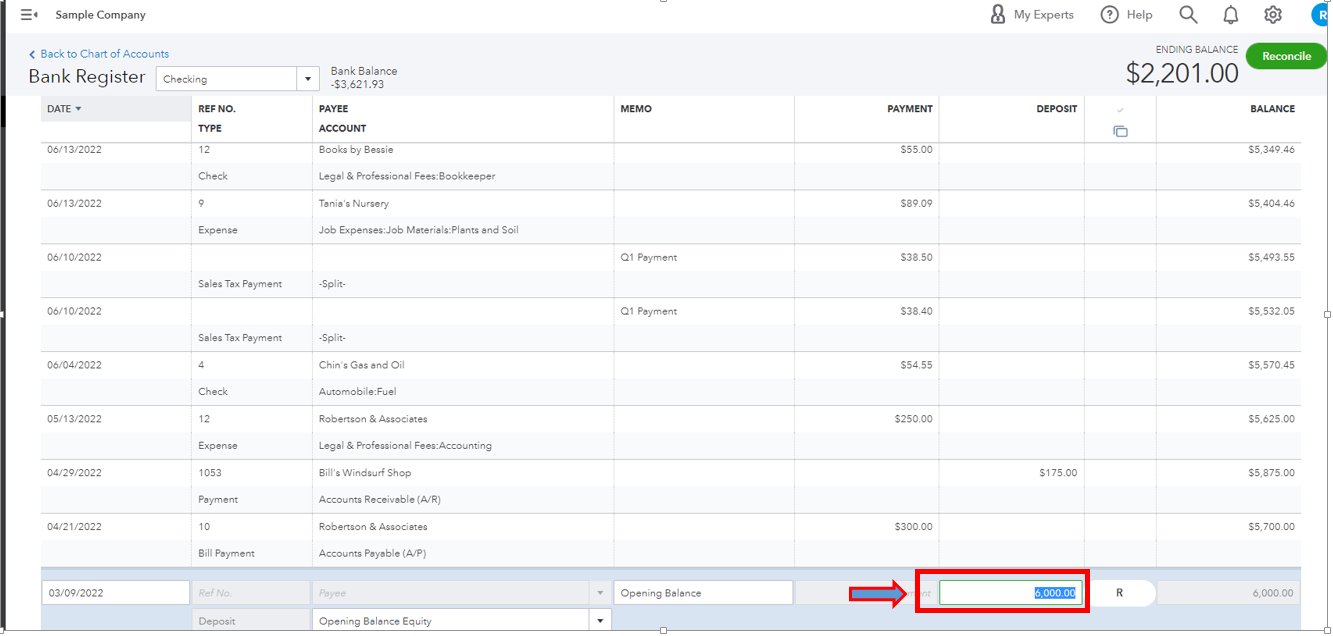
- Once done, hit Save.
For your reference, you can read this article for more detailed information: Fix issues the first time you reconcile an account in QuickBooks Online.
When done correcting the balance, use this resource to help you with the reconciliation process: Reconcile an account in QuickBooks Online.
Leave a comment below if you need further assistance with the process. Have a great day.


