I have information here to ensure that your ending balance on the previous month will align with the opening balance for the next month, emcase. I'm here to assist you every step of the way.
To maintain your transaction balance and make it accurate, consider reviewing your opening balance if it's correct. Here's how:
1. Go to the Gear icon, then Chart of accounts.

2. Find the account on the list.
3. Click View register.
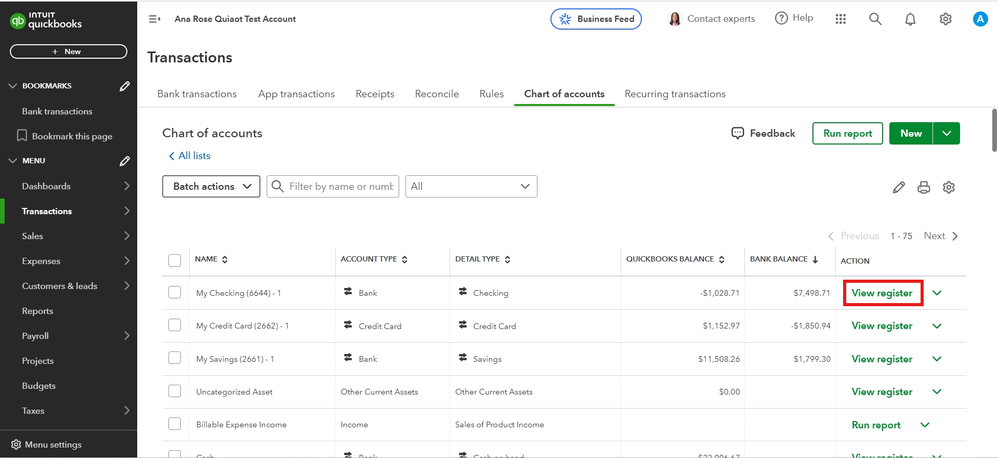
4. Look for the opening balance entry. It should have 'Opening Balance Equity' in the Account column.

5. Take note of the date and balance.
The next step is to check your bank statement. Follow the steps below:
1. On the left panel, select Transactions and click Reconcile.
2. Choose the account that you want to reconcile from the Account ▼ dropdown. Please note that if you have multiple accounts at the same bank, or more than one account of the same type, make sure you're reconciling the right one.

For the other steps, you can read this article: Fix issues for accounts you've reconciled in the past in QuickBooks Online.
You can check this reference on the account starting point you set when you first created it in QuickBooks: Fix issues the first time you reconcile an account in QuickBooks Online.
If you need further guidance on fixing your books, feel free to add them below. Have a good Day!


