Hello Iscllc05,
Welcome to the community! Thank you for reaching out. I understand that managing transactions in QuickBooks Online (QBO) Solopreneur can be a bit confusing, so let’s clarify how this works.
First, may I ask for more details about your issue? Are you trying to delete or exclude a transaction but encountering an error while doing so? Or are you inquiring if it's possible to delete or exclude a specific transaction? Any additional information will help us better understand your situation and provide the right solution.
For Manually Added or CSV-Imported Transactions: If you delete or exclude these entries, they will be permanently removed from your records.
For Transactions from Connected Bank Feeds: These transactions can be excluded, but they cannot be deleted. If you are having trouble excluding them, please log out and log back in to refresh your session before trying again.
Here’s how to exclude a transaction in Solopreneur:
- Go to the Transactions tab.
- Locate the transaction you want to exclude and select the checkbox next to it.
- Click Exclude.
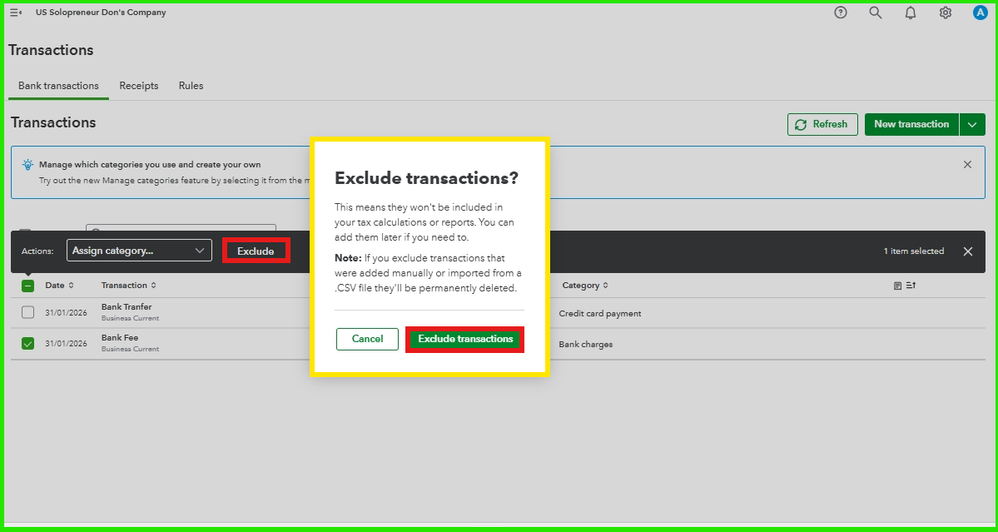
For further guidance, you may find this article helpful: Exclude bank transactions in QuickBooks Solopreneur.
If you still have questions or need further assistance, feel free to leave a comment below. We're always happy to help ensure everything runs smoothly for you. Have a great day!


