Turn on suggestions
Auto-suggest helps you quickly narrow down your search results by suggesting possible matches as you type.
Showing results for
Get 50% OFF QuickBooks for 3 months*
Buy nowI have an asset register called 'loans to others'. The company lent a few dollars to some people which mostly got paid back. My boss asked me to zero out the remaining balance (like a credit). How can I do so without physically getting the funds returned?

Hi there, @sw1222. In accounting terms, when you zero out a loan that isn't being repaid, you are essentially writing off the debt. Since you aren't receiving cash from this loan, you need to transfer that balance from your Assets account to your Expenses account.
To do this, you'll need to create a Clearing account first. A Clearing account is used to move money between accounts when direct transfers aren't possible.
Before proceeding, I recommend consulting your accountant as you go through the steps. They can provide guidance tailored to your business setup and situation.
Here’s how to set up a Clearing account:
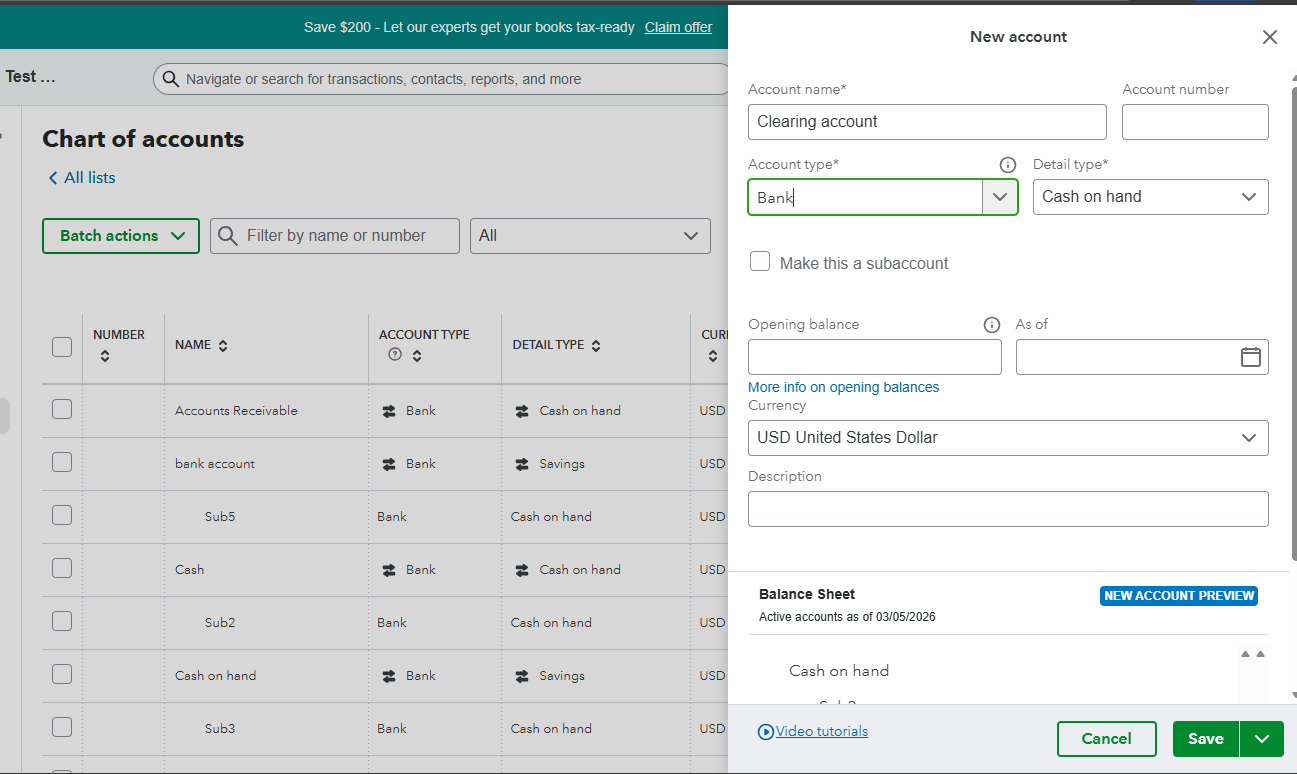
After creating the account, since there isn't an actual bank transaction (no money coming in), you'll have to use a Journal Entry to move the figures. For further guidance on the next steps, please refer to this article: Use a clearing account.
If you have any additional questions, please feel free to revisit this thread.
Thank you! But once i create that clearing account, wont i have to create an additional journal entry to make the balance zero?
Good day, @sw1222. That is a great catch, and you are exactly right. Using a clearing account is a two-step process to ensure your books stay balanced while moving the money to the right place. Here is how those two entries work together to get you to zero:
With that said, after creating the clearing account, record the Journal Entry (JE) to zero out the Loan. However, before you proceed, it's advisable to consult your accountant. They can provide guidance on which accounts to debit or credit, ensuring that everything is configured correctly. Then, follow these steps to move the money from the Loans to Others asset into the Clearing Account:
Once this is done, your Loans to Others balance will be $0, while your Clearing Account will now show a balance. To bring everything to zero, you will need to transfer that balance to an expense. This requires creating another JE. Again, be sure to seek your accountant's guidance before completing these steps to confirm that the correct accounts will be debited or credited.
I know that adding an extra step can feel like more work, but using this clearing account method provides a crystal-clear audit trail that your boss and accountant will appreciate. It ensures that every dollar is accounted for as it moves from an asset to a final expense.
Once you’ve had that quick chat with your accountant to confirm the specific categories, you'll be all set to clear those balances for good. Let me know if you have other QuickBooks questions. I'm here to help.
Hi, @sw1222.
I just wanted to follow up to check if the resolution we provided helped resolve your issue.
Please let us know if everything is now working as expected or if you’re still experiencing any problems.
We’ll be glad to assist further if needed.
Thank you.
Would you be able to give me an idea of how you would do the second entry to bring the clearing account to zero?
To bring your clearing account back to zero, simply transfer the balance to your expense account sw1222.
You can do this by creating a second journal entry. Here’s how:
To ensure the accuracy of your records, I'd highly recommend consulting with your accountant, especially regarding which accounts to debit and credit, to avoid any discrepancies.
Feel free to return to the Community if you have other questions or concerns. We're always here to help.
Wow, you've been getting some extremely poor answers from QB staff. The easiest way to close this account is to create a journal entry that debits an Other expense account and credits the Loans to Others asset account for the balance. Since there is a balance in the asset account, it indicates the loan wasn't fully repaid, and that's considered a loss (expense). Use an 'Other expense' account, not an 'Expense' account, on the debit entry because a loss on a loan (unless you're a lender) is not considered part of the business's primary operations.


You have clicked a link to a site outside of the QuickBooks or ProFile Communities. By clicking "Continue", you will leave the community and be taken to that site instead.
For more information visit our Security Center or to report suspicious websites you can contact us here


