Turn on suggestions
Auto-suggest helps you quickly narrow down your search results by suggesting possible matches as you type.
Showing results for


I noticed the app doesn't support QBO. You can use an importer tool
https://get.transactionpro.com/qbo
Good day, @elisabethmadeja5. I appreciate your interest in importing sales transactions from a CSV file. Let me provide you with some insights about the types of transactions you can import using a CSV in QuickBooks Online.
Currently, QuickBooks Online does not support direct importing of sales transactions such as discount and refund transactions using a CSV file. However, as a workaround, you can explore third-party applications that enable you to upload your expense receipts. These applications may provide the functionality you are looking for.
To check for apps compatible with QBO:
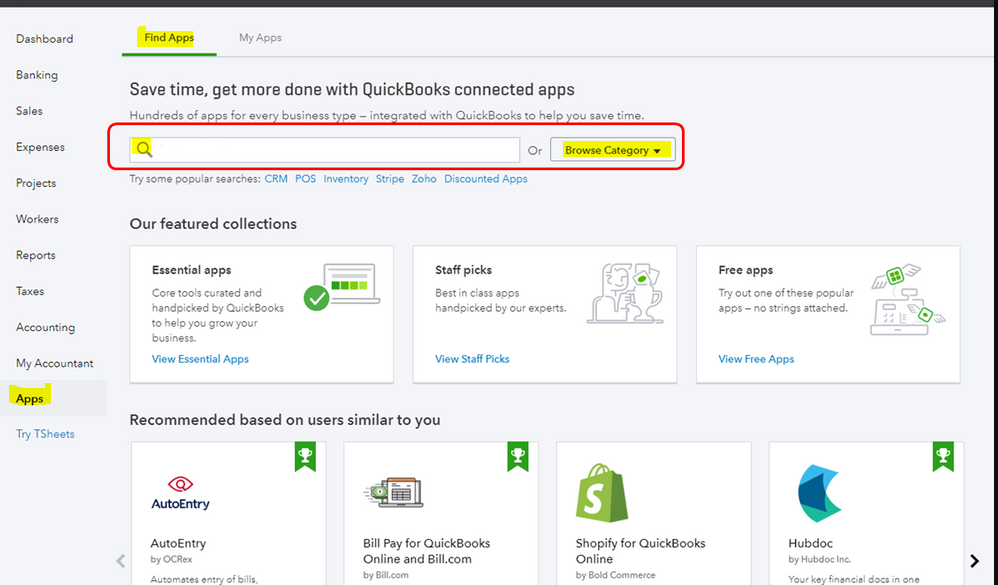
To view a wide range of options, use specific keywords to narrow down the search. You can check the reviews from other customers to help you decide which app suits your business type and needs.
On the other hand, you can import a list of your products and services from Excel, CSV, or Google Sheets to QuickBooks Online. For more details, see this article: Import products and services into QuickBooks Online. It contains tips on how you can import your Income and Expense account.
You can get directly in touch with me if you have additional questions about importing sales transactions in QuickBooks Online. I'd be more than willing to lend you a hand. Take good care.


You have clicked a link to a site outside of the QuickBooks or ProFile Communities. By clicking "Continue", you will leave the community and be taken to that site instead.
For more information visit our Security Center or to report suspicious websites you can contact us here



