Hi there, @phxuser. I'm here to provide information on how you can import your transfer transactions in QuickBooks Online (QBO) to prevent duplicates.
In QBO, handling transfers is a bit different. For instance, if there are transfers between two accounts, and you set up bank feeds for those accounts, you'll have a transaction downloaded for money leaving one account as well as money entering the other. That said, you'll need to perform some processes to record it correctly in the system.
To begin, add the transfer from one account. However, in the other account (which is the other half of the transfer) instead of adding that bank feed transaction, match it to the transfer in the system. It can be a tricky process, so I recommend reaching out to the Customer Care team support for additional assistance.
Then, to batch exclude the duplicate transactions, below are the steps you can perform:
- In your QBO account, select the Banking menu and choose Banking.
- Next, select the account where the transactions are located.
- Then, go to the For Review tab.
- From there, check the box of the transactions you want to Exclude.
- After that, click the Exclude button.
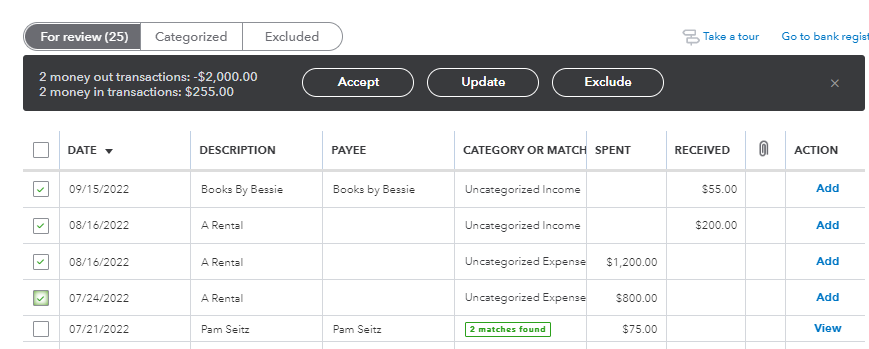
For reference, feel free to visit this article: Exclude a bank transaction you downloaded into QuickBooks Online.
I'd love to know how this process goes. I'd appreciate any details that you can add. If you have further questions about managing your transfer transactions in QBO, feel free to get back in this thread. I'm always ready to lend a hand. Keep safe and take care.


