QuickBooks retrieves the same bank details each time they are downloaded, as it relies on your bank's data or information entered during the import process, @ericlchua.
Before we proceed, could you clarify whether this transaction comes from your bank feed or if it was manually imported?
QuickBooks can't edit or change the original details of imported transactions from your bank feed because we're only the receiving party. However, you can use the Notes field to add or modify the original details.
Here's how:
- Navigate to the Transactions tab.
- Find the transaction you want to fix and click the arrow.
- In the Notes box, enter the original details from your bank statement.
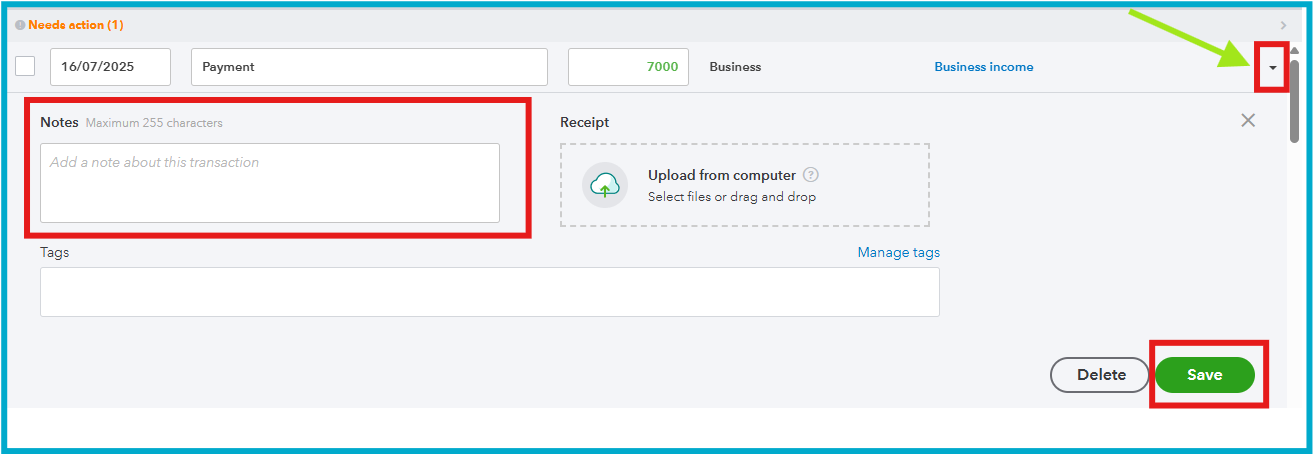
- Select Save after.
If you're importing a file (like a CSV) manually, the best way to prevent rewording is to edit the description column in the file before importing it. After you've corrected the file, you can re-import it.
Please let us know if you have any more questions by submitting your response below.


