We can use the Exclude tab feature to eliminate duplicate transactions, gidge89.
Always back up your transaction records before removing duplicates to recover any mistakenly deleted data.
Here's a step-by-step guide:
- Go to the Accounting menu and select Bank transactions.
- Locate the duplicate transactions.
- Select the checkbox of the transactions to exclude.
- Click Exclude.
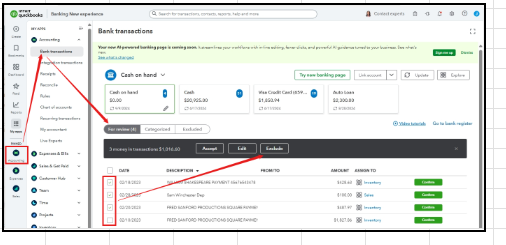
Once deleted, you can start reconciling the account to ensure QuickBooks balance matches your bank statement.
Are you familiar with our QuickBooks Live Expert Assisted team? They are great at streamlining how you manage entries and oversee your financial activities. Connect with them for tailored support.
Don't hesitate to reply if you have further concerns, and we're here to assist you.


