Turn on suggestions
Auto-suggest helps you quickly narrow down your search results by suggesting possible matches as you type.
Showing results for
Get 50% OFF QuickBooks for 3 months*
Buy now
Let me make it up to you by ensuring you'll be able to split a check when creating rules in QuickBooks Online (QBO), kgoswick82.
We can create a new rule specific to that transaction to auto-add/match. If you prefer otherwise, we can still manually split it by clicking the transaction and selecting Split transaction. I've added screenshots for your reference.
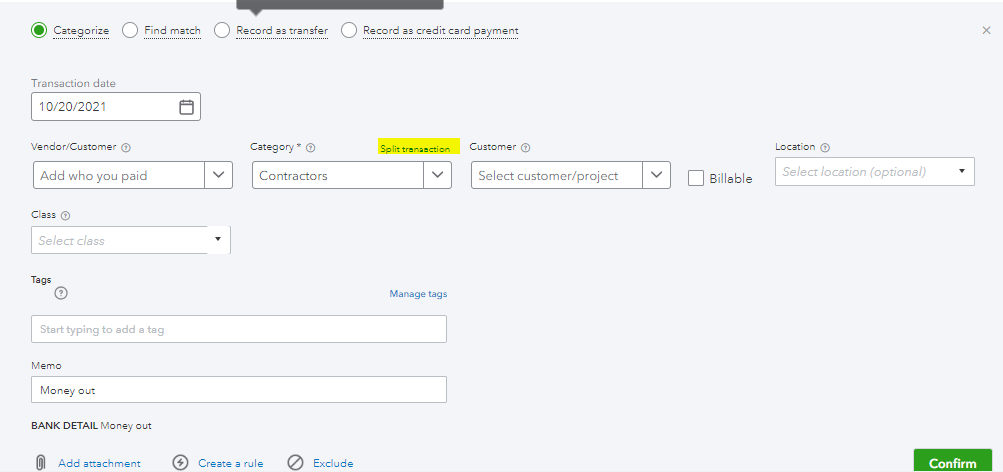
To add a new rule, here's how:
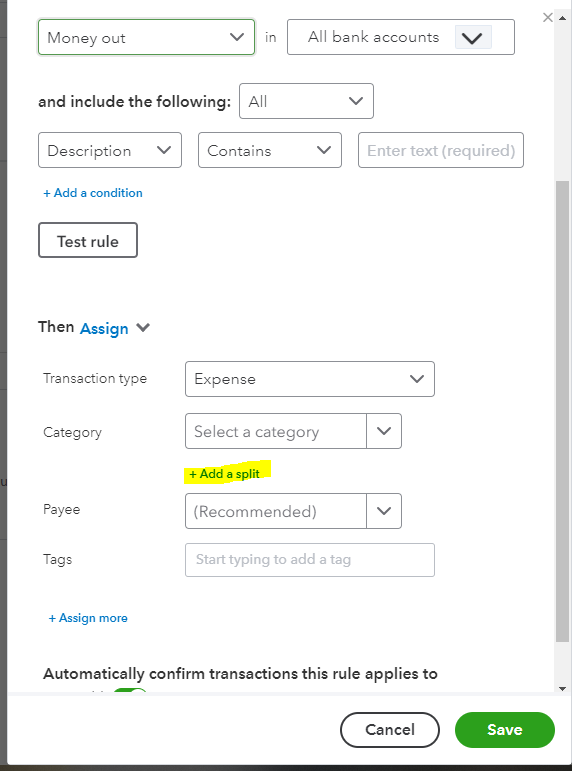
5. Select the Transaction type, Category, Tags, and the Payee to apply.
I've added this article on how to properly categorize and match online bank transactions in QuickBooks Online.
Let me know if you still have other questions or concerns about splitting transactions. I'll be here to help. Have a great day
Thanks but like I said in my question, Rules won't work because its not recurring. Its different every time. I found the solution myself by clicking new and then choosing check. Its also how you create a split deposit.
Thanks but like I said in my question, Rules won't work because its different each time. Its not recurring.
I found the solution myself by clicking new+ at the top of the sidebar menu and choosing check. You can also add a split deposit this way too.


You have clicked a link to a site outside of the QuickBooks or ProFile Communities. By clicking "Continue", you will leave the community and be taken to that site instead.
For more information visit our Security Center or to report suspicious websites you can contact us here


