It's nice to hear from you, conardtl!
Yes, you can add another checking and saving account from another bank.
I'll make sure to help you achieve this in no time. Here's how:
- Go to the Accounting menu.
- Within the Chart of Accounts, click New.
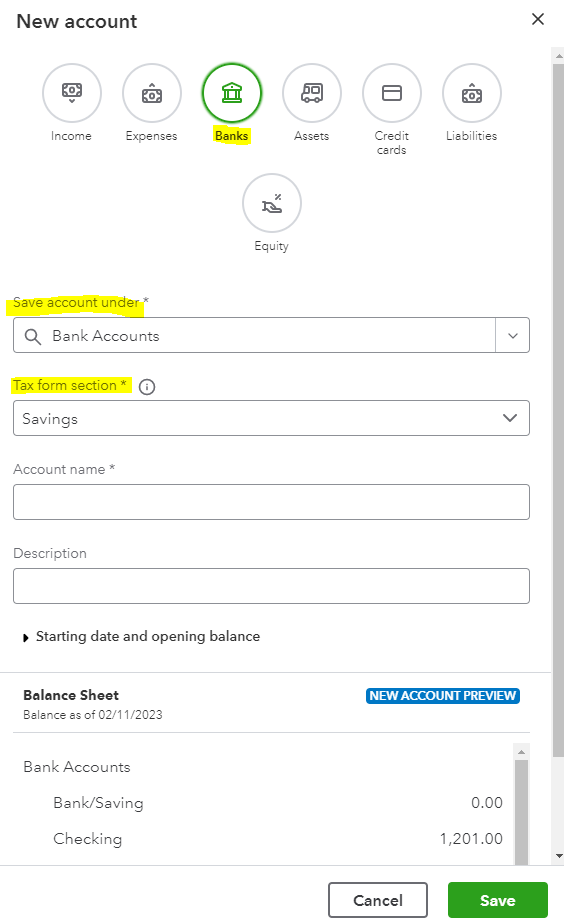
- Click the Save account under* drop-down arrow. Then, choose Bank Accounts.
- Under the Tax form section* field, select Savings or Checking.
- Enter the account name and other details.
- Hit Save.
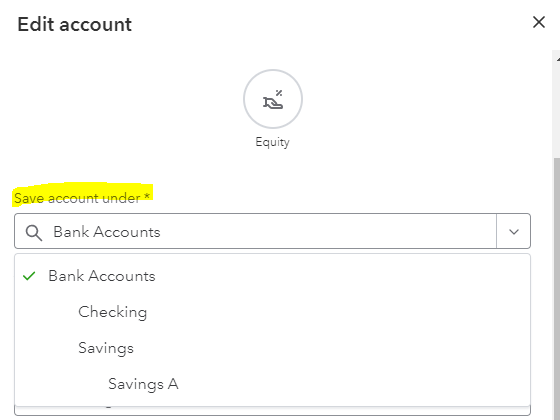
To make this account a subaccount, let's edit it. Here are the steps that will walk you through the process.
- Still, within the Chart of Accounts tab, find the account you want to make as a subaccount.
- Click the drop-down arrow under the Action column. Then, select Edit.

- Change the Banks Accounts to another existing parent account.
- Hit Save to reflect the changes.
For more details on editing the Chart of Accounts, such as customizing Account Details, I suggest the following article: Edit Your Chart of Accounts.
Also, I've gathered some articles where you can get more ideas about managing accounts in QuickBooks Online:
If you have other concerns about adding and modifying accounts in QuickBooks Online, please don't hesitate to post again. I'd love to help you anytime. Take care and have a good one!


