Hello there, Marilyn.
I'll be happy to provide tips to ensure your transactions appear after an automatic connection.
Most banks update transactions in QuickBooks every 24 hours, although the timing may vary. To access the most recent transactions, you can perform a manual update. If you receive a verification prompt, follow the on-screen instructions to complete the process.
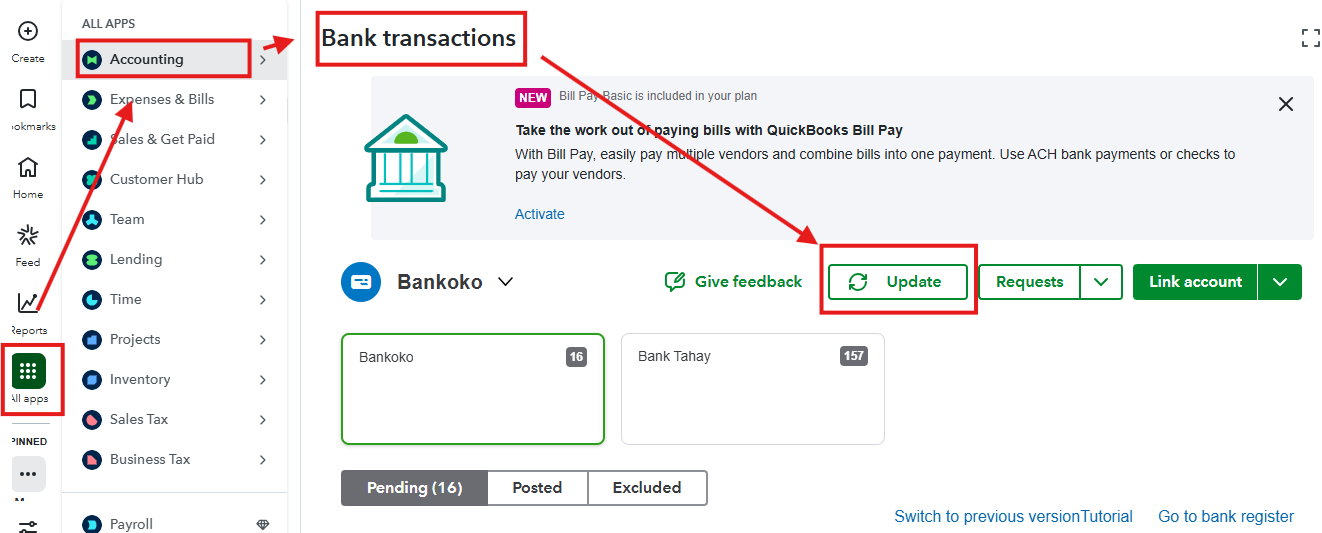
Here's how to update:
- Navigate to All Apps, then click Accounting.
- Select Bank Transactions.
- Click Update.
Note that most banks typically do not download transactions older than 90 days. If you need to include older transactions in your records, you can manually upload them.
It's also helpful to check your bank's website regularly for security updates or alerts, as these can affect the connection. Look out for display issues, account messages, or notifications that can impact syncing. Staying informed about your bank's changes allows you to proactively address problems and ensure accurate transaction tracking in QuickBooks.
For more information, you can also visit this article: Find missing downloaded transactions in QuickBooks Online.
Please don't hesitate to reach out to the QuickBooks Team if you need additional help.


