Hi @NOSw2, welcome to the Community! I'm here to give you some steps on how to successfully connect your bank account.
Since the transactions you manually imported are the same as those in your bank account, you can upload your bank feeds a day after the latest QuickBooks Online (QBO) transactions.
After confirming the date of your latest manually imported transaction, we can now connect your bank feeds.
Here's how you can do it:
- Go to Transactions.
- On the Bank transaction page, click Link account.
- Search for your bank by entering its name or URL in the search field.
- Enter your bank credentials and click Continue.
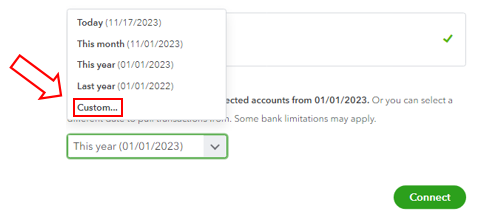
- Select the account you want to connect and choose the specific date you want to import from your bank by clicking Custom.
- Click Connect and Done.
This article will be very helpful if you encounter duplicate transactions while importing bank feeds. It explains how to exclude a bank transaction that you downloaded into QBO.
If you have any questions or need further assistance in connecting your bank transaction to QBO, please don't hesitate to reach out to me. I'm always here to lend a helping hand. Take care!


