Turn on suggestions
Auto-suggest helps you quickly narrow down your search results by suggesting possible matches as you type.
Showing results for
Get 50% OFF QuickBooks for 3 months*
Buy now
It's a pleasure to have you in the Community today, @studiop3llc. I've got you covered, and let's work this out so you can complete your tasks in QuickBooks Online (QBO).
Before we do so, can you tell me more about your concern? Are you trying to enter a transaction into your QBO account? Or are you attempting to take a snapshot of your receipt in QuickBooks Online mobile? This way, I can provide you the most accurate resolution to your query.
@studiop3llc, I'll be here in the Community space. Don't hesitate to get back to me by clicking the REPLY button below. I'm determined to help you get through this. Take care, and have a good one!
Thanks for reaching out. I’m just looking at my linked bank account on QB mobile and it’s not showing me any transactions since 10/5.
Thank you for getting back to us with some clarification. I'm here to chime in and assist you with downloading your recent transactions in our QuickBooks mobile app.
In the mobile version, there's an option to refresh the connection of your linked bank accounts. QuickBooks will attempt to communicate with your ban to download your recent data.
It's visible within the Transactions section, located in the upper-right part beside the Bank icon. Here's how:
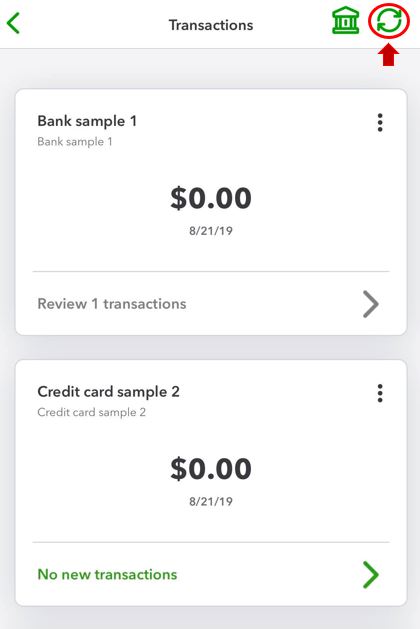
After following the steps above, your bank data will automatically download and update. You can check if there are changes to the dates for each account.
Additionally, you can get transactions from your bank or credit cards and manually import them into QuickBooks Online via the web browser. For your reference, check out this article: Manually upload transactions into QuickBooks Online.
Drop me a comment below if you have more questions about the Banking features. I'll be happy to help you some more.


You have clicked a link to a site outside of the QuickBooks or ProFile Communities. By clicking "Continue", you will leave the community and be taken to that site instead.
For more information visit our Security Center or to report suspicious websites you can contact us here


