Hi oberreitb,
The option to delete an account in the Chart of Accounts page is unavailable. When the system reach its limit, we can either delete an account user, delete classes or locations, delete tags, or upgrade your QuickBooks account.
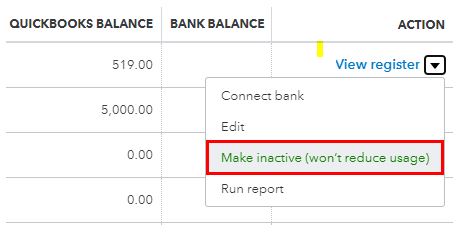
Also, if you no longer needed the accounts, we can deactivate them. Let me guide you with these steps:
- From the Accounting tab, select Chart of Accounts.
- Find the account you want to deactivate.
- Under ACTION, select Make inactive.
I've also added this reference as your guide about usage limits: What are the usage limits for my subscription?
I'll be around if there's anything that I can help with. Take care!


