Hello, Pam.
The way how transactions are categorized depends on how you handled them (and what functions you used). I have two possible ways to help you correct the transaction and ensure it is set as a Transfer.
Did you process and categorize the transaction through the Online Banking feature? If so, you'll want to undo it and recategorize it as a Transfer.
To undo the transaction:
- Go to the Banking page.
- Click the Categorized tab.
- Find and locate the transaction and click Undo.
- Go back to the For review tab
- Select find and select the transaction again.
- Under the Transaction type drop-down menu, select Transfer then choose the transfer bank account
- Add other details, then click Confirm.

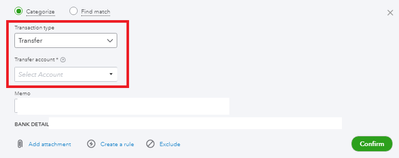
However if this is a manually added transaction, you'll want to delete and recreate it using the Transfer feature instead:
- Go to your bank register.
- Select the Transaction, then hit Delete.
- Click Yes on the confirmation window.
- To recreate it, go to the + New button.
- Select Transfer.

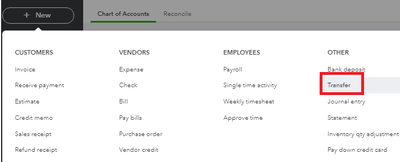
Complete the form and don't forget to add a memo such as "Bank transfer for loan" or something similar.
If this transaction is under a closed period, be very careful when dealing with this. It will mess up your balances. I recommend contacting an accountant so they can guide you with the correction.
Ready to reconcile your bank accounts? Check this article to guide you through the process: Reconcile an account in QuickBooks Online.
I'm right around the corner, so jump by in this thread again if you have more questions. I'm here to help.


