QuickBooks Online (QBO) relies on the data being entered or fed into the system. The QuickBooks Help article that you're referring to only provides information which apps will be migrated to QuickBooks and doesn't relate anything on your issue, Janel.
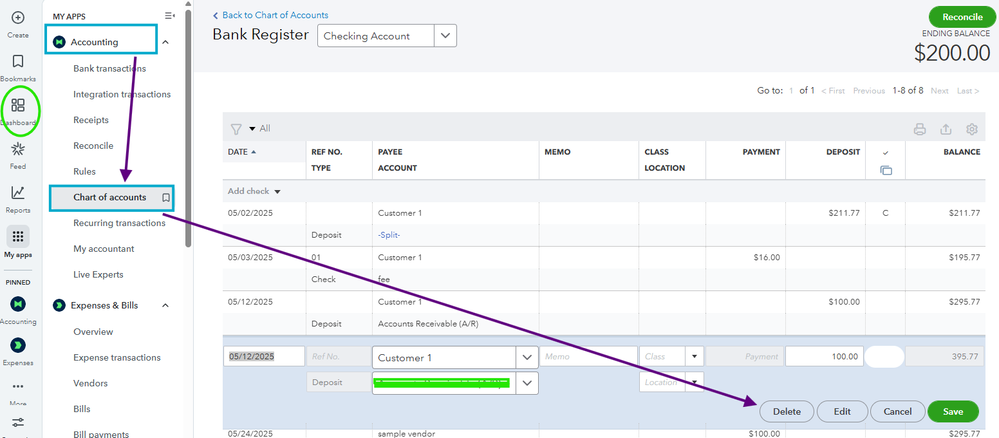
You can manually delete the transactions from your chart of accounts if transactions showing are not valid. To do so, follow the steps below:
- On the Dashboard, go to the Accounting tab.
- Select Chart of Accounts and choose the account where the extra transactions are showing.
- Click View register.
- Locate for the transactions and hit Delete.
- Then Save.
On the other hand, any changes made by the System Administration occur when you're connected to a third-party app. These changes take effect when the app sends data to QuickBooks, potentially modifying your existing data.
Additionally, you may also want to reach out to Shopify support team to confirm if any syncing issues have been reported and to get guidance on how to address them effectively.
It is important to familiarize the synchronization options available in the configuration settings. read this article for reference: Shopify and QuickBooks Online Integration Guide.
Feel free to inform me if you have any other queries or questions with integrations. I'm always right here to help you all the time.


