We acknowledge how much time you've spent connecting your checking account to QuickBooks Online (QBO), mandi_s10. I'll route you to the appropriate support, ensuring you get the necessary assistance.
Since the issue has persisted for several months, I recommend contacting our Live Support team. With the right tools and expertise, they can dive into the root cause of the error, "It looks like this part of our site isn't working right now," and provide the most relevant fix.
Here's how:
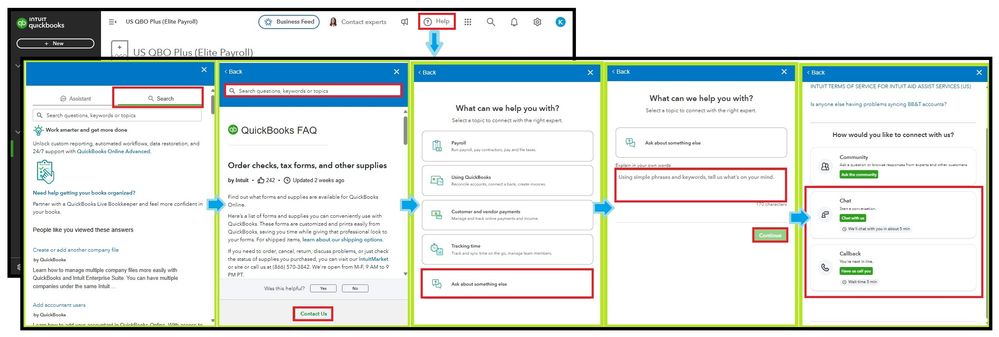
- Sign in to your QBO account.
- Select (?) Help and proceed to the Search tab.
- Enter a question or topic from the designated field or open an article.
- Click Contact Us at the bottom of the Help panel.
- Pick the Ask about something else option and add details of your concern to Continue.
- Choose Chat with us or Have us call you.
Additionally, please observe their support hours to connect with them at the most convenient time.
Once your bank account is linked to QuickBooks, transactions will automatically download. It is essential to categorize these entries to maintain organized financial records and ensure accurate accounting.
Our Community is here to help you every step of the way with your QuickBooks Online journey. Whether you're setting up a bank connection or managing transactions, feel free to reach out with any questions or if you need clarification. We're always eager to help.


