Good day, jberberich907. It's very easy to match a downloaded bank transaction into two manually entered bill payments.
You can follow these steps:
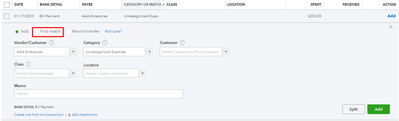
- Go to Banking and select the downloaded transaction to expand it.
- Click on Find match radio-button.
- You'll see the manually entered bill payments on the Match transactions page. If you can't find them, make sure the dates are correct.
- Check them, then hit Save.
Here's an article about reconciliation. It'll guide how to properly reconcile your accounts in in QuickBooks Online.
The Community is always here to help you if you have other concerns. Wishing you all the best!


