Thanks for coming in the Community, @rick-rivetingdes.
In QuickBooks Self-Employed, you'll have to manually enter or copy and paste the details. To enter customer details, follow the instructions below:
- Go to the Invoices menu.
- Click the Create invoice option.
- Then, click the Add customer drop-down and select + Add new.
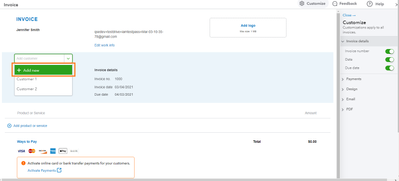
- Enter the customer's details.
- Click Save.
- Repeat step 3 to 5 to add another customer.
Feel free to use these articles that will help you handle your account and customer invoices:
Let me know if you have other questions about adding customers in QuickBooks Self-Employed. I'm always here to help. Take care and have a great day!


