Ensuring the reporting period, statement date, and account are good starting points to fix the transaction that doesn't show in the reconciliation window, @ESCSKilgore. I appreciate you for doing that.
I'll share some troubleshooting steps so the deposits or checks will show on the reconciliation page. This way, your opening balance will be correct at all times.
May I ask which window you undo the dark check? Do you mean on the Reconciliation or Register page? Any additional information will help me provide an accurate explanation and solution.
In the meantime, let's ensure that the check and deposit dates are correct. With this, I'd recommend checking the Check Detail report to review your transaction.
Here's how:
- Go to the Report menu on the upper right side.
- Select Banking, then Check Detail.
- Click the Customize tab.
- In the Filter tab, type Transaction Type and put a check mark in the Check and Deposit.
- Hit OK.
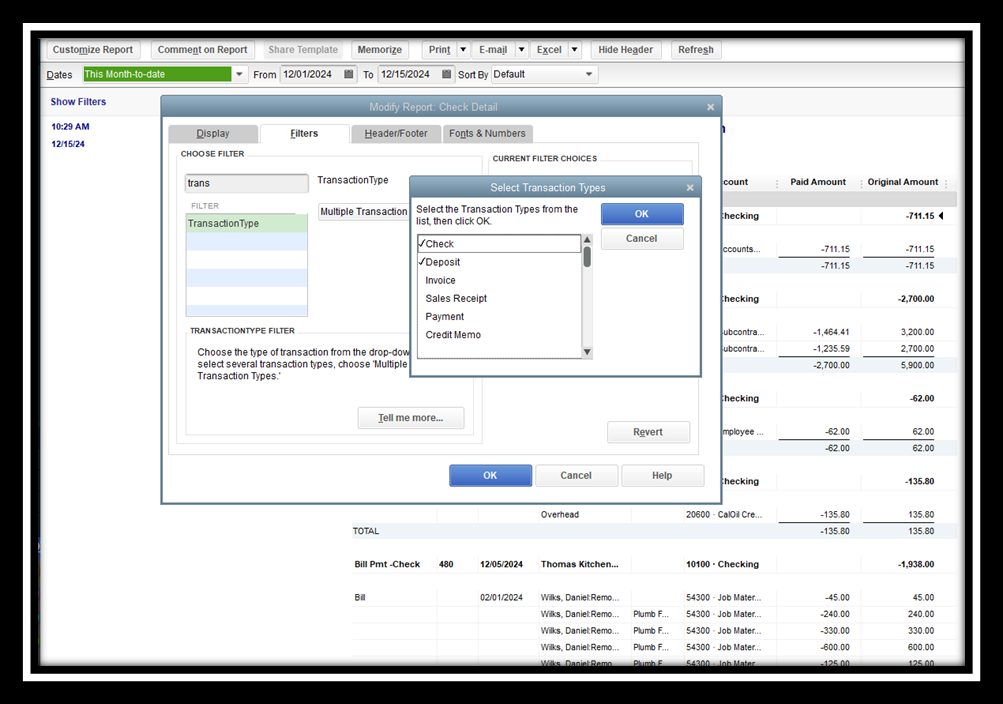
Once done and the issue persists, ensure that the transaction is not included in the previous month's reconciliation. Please review the Previous Reconciliation Detail report. If you see the transaction, I'd recommend performing a special reconciliation. This way, the deposit or checks will show when you reconcile the recent period. For the complete steps, check out this article: Find reconciliation discrepancies (Mac).
Once fixed, you can now proceed with reconciling your recent transactions.
Feel free to download our QuickBooks Desktop for mac user's guide for future reference. This PFD file contains an explanation and steps for managing your account.
I'm always here to listen if you have additional concerns with reconciling accounts. You're welcome to post again or leave a reply below. Stay safe.


