Restoring a deleted bank account in QuickBooks Online (QBO) is easy, depending on how you removed it in our software, @dperas1. I will provide scenarios that are applicable to restore your bank's connection to the system.
If you deleted your bank account via disconnecting in QBO, you will need to reconnect it the same way you did the first time you connected it to restore the record of your removed bank account.
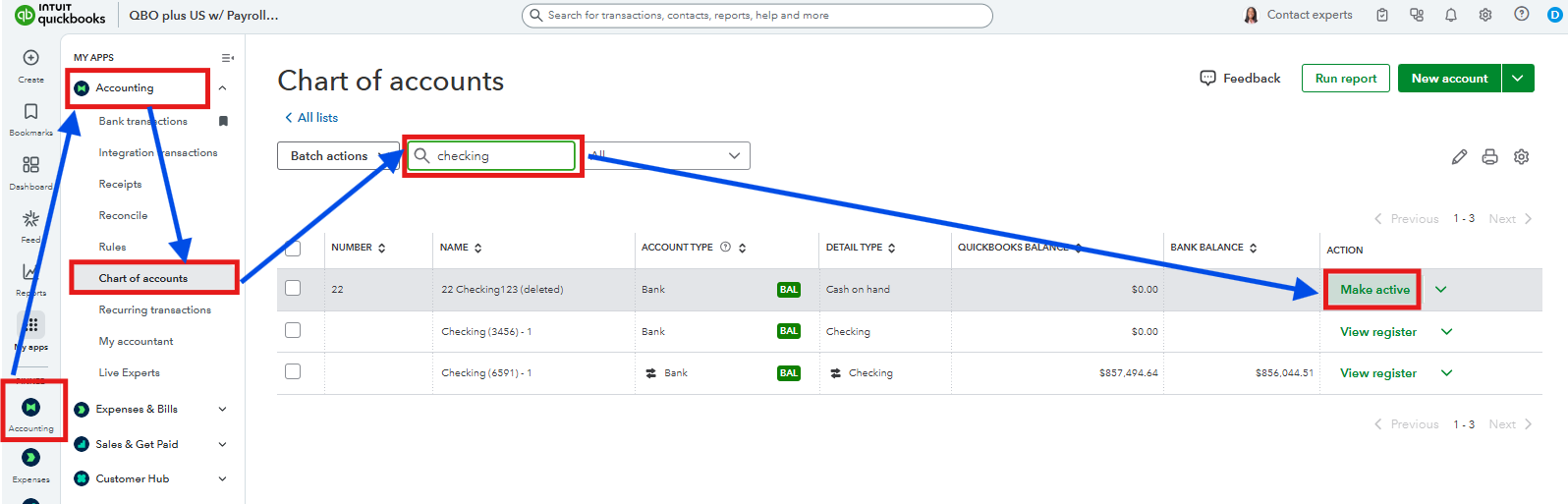
However, if you just inactivated the account in the Chart of Accounts section, simply make it active. Here's how:
- Go to the Accounting tab.
- Pick Chart of Accounts.
- In the Search field, enter the name of the bank account you inactivated.
- Then, click the Make active option below the Action column.
Bank accounts in QBO are an essential part of making sure that you have tracked your transactions accurately in your book of accounts. Leave a comment below if you have additional questions about restoring your bank account in our software.


