Get 50% OFF QuickBooks for 3 months*

Buy now
cancel
Showing results for 
Search instead for 
Did you mean: 
Announcements
Gabalot
Level 2

Square integration

Hello, I have integrated my square with QuickBooks and I have been adding transactions with no problem. Suddenly today I couldn’t add transactions because I got an error: “we couldn’t add the transactions due to ‘you must specify a date’. Check account mapping in advanced settings and try again”. Why suddenly is this not working and anyone able to fix this? Thank you!!!!

1 Comment 1
CharleneMaeF
QuickBooks Team

Square integration

It can be challenging when you can't add your Square transactions, Gabalot. I'm here to help you out.


I recommend contacting our phone or chat support team. They have tools to investigate the cause of this and provide additional solutions to fix the problem. I've included the steps to contact support below. 


  1. Go to the Help (?) icon at the top.
  2. On the Assistant tab, click Talk to a human.
  3. Enter the issue in the Type something field, then click the Send icon.
  4. Click on I still need a human.
  5. Select Get help from a human.
  6. You can either select Chat with us or Have us call you.
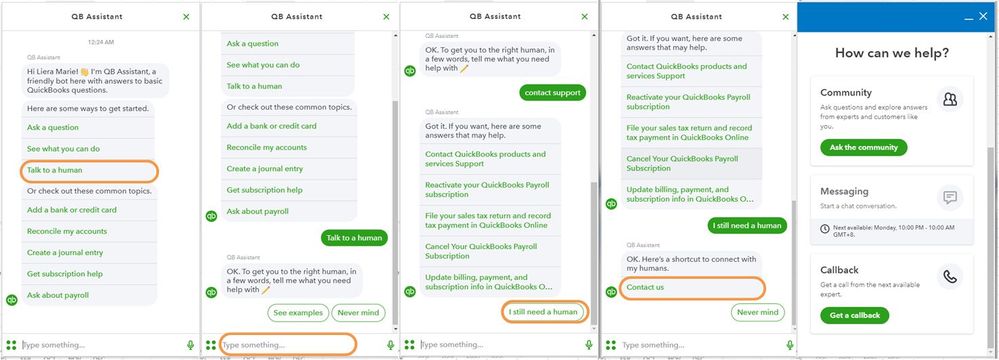
    help.JPG


If you have any other concerns or questions about managing your transactions, please don't hesitate to add a comment below. I'll be glad to help you out.

Need QuickBooks guidance?
Log in to access expert advice and community support instantly.

Need to get in touch?

Contact us