Turn on suggestions
Auto-suggest helps you quickly narrow down your search results by suggesting possible matches as you type.
Showing results for
Get 50% OFF QuickBooks for 3 months*
Buy nowWhen I receive a check for an invoice, I receive the payment into Undeposited Funds. After I go to the bank, I create a bank deposit and select all of the undeposited funds included in the deposit. While this ties the invoices to the bank deposit, I need to associate the funds with the account categories, i.e., 5001 Tickets, 5002 Swag, etc. How do I associate the payments from the invoices with the correct account categories?

Hi there, @hh5798.
Associating the funds with the account categories manually is only available on the Banking page. Although, if you just want to track the sale on the sales forms or bank transactions, you can utilize the class list feature in QuickBooks Online.
I'll show you how to assign a category on the banking page. Here's how:

Also, about the class feature, you can assign it in the invoices or bank transactions. To know more details about this, you can check out this article: Get started with class tracking in QuickBooks Online.
You're always welcome to tag my name in the comment section if you have other questions. I'd be happy to help. Take care.
The deposit has already been reconciled and doesn't show up in the Banking, For Review section. Do I need to un-reconcile in order to assign the account code?
Can checks from mixed account codes be included in the same deposit , e.g., will this assignment affect all of the checks in the same deposit transaction?
Thanks.
#MarsStephanieL
Thanks for getting back to the Community, @hh5798.
Since the deposit has already been reconciled, yes, you’ll want to unreconcile it in order to assign the account code. That way, the transaction will go back to For Review tab under the Banking page.
To do so:

Check out this link for more insights about unreconciling transactions. It includes articles that can guide you during adjustments and help fix any related errors.
Regarding your second question, checks from mixed account codes will be included in the same deposit since you’ve incorporated the funds as one. And by that, assigning account categories might affects the event. I recommend consulting with your accountant before performing any of the steps. This is to ensure your records remain accurate.
Reach out to me directly if you have additional questions about banking. I'm here to answer them for you. Have a good one.
How can i assign a category to a deposit that was made from undeposited funds?
Hi there, @musseldoc. I'm here to help assign a category to your deposit transactions in QuickBooks Online (QBO).
Categorizing the deposits allocated in the Undeposited Accounts is not possible. This is used to keep all deposits and payments until you deposit them in your desired account. You'll have to move the transaction to the correct bank or credit card account before you can assign a category to them. For reference, feel free to check this article: What’s the Undeposited Funds account?.
Once moved, here's how you can assign a category:
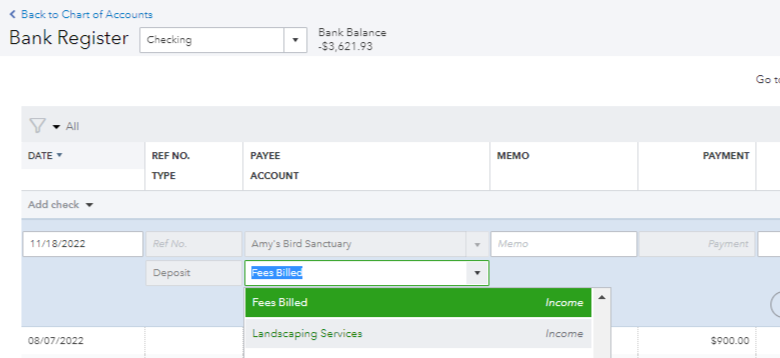
You can visit this article for more info on categorizing transactions in QBO: Categorize and match online bank transactions in QuickBooks Online.
It's also recommended that you regularly perform the reconciliation process to ensure your account's balance matches your real-life bank account. To get started, check out this article: Learn the reconcile workflow in QuickBooks.
Please let me know if you have any other QuickBooks concerns. I'm just a post away to help. Have a good one and keep safe always.


You have clicked a link to a site outside of the QuickBooks or ProFile Communities. By clicking "Continue", you will leave the community and be taken to that site instead.
For more information visit our Security Center or to report suspicious websites you can contact us here


