I'd be please to help guide you to where you can see the two deposits to verify your account for direct deposit, deanbaggs27.
Once you set up your bank account for direct deposit, we'll need to wait 2-3 business days for the two small debits taken from your account as a test transaction.
These deposits will appear on your bank statement either "QuickBooks: Verify Bank" or "Intuit: Verify Bank".
I'd suggest logging into your online banking or bank's website to check for those debits and follow the steps below to verify them in QuickBooks:
- Click the Gear icon ⚙ and choose Payroll Settings.
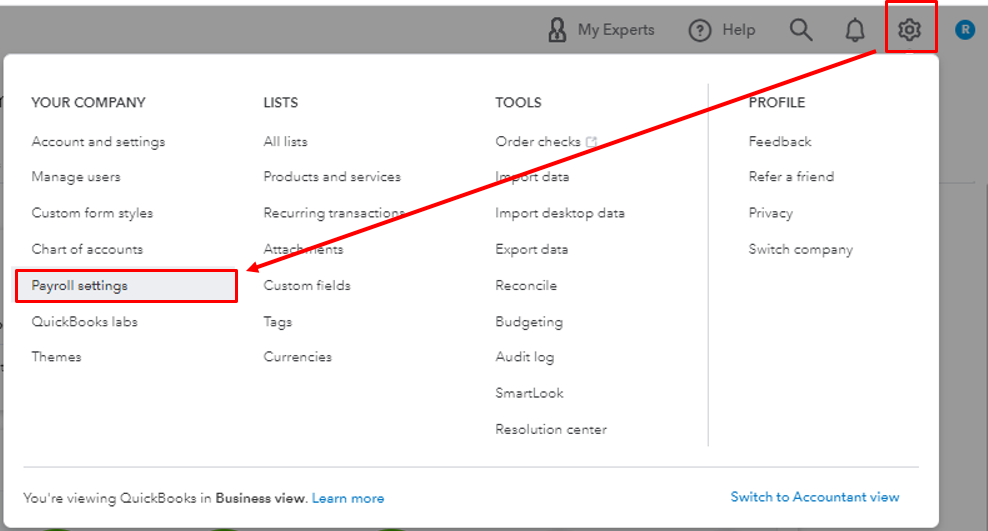
- Under Bank Accounts, select Company.
- Select Verify Account, enter the two small deposits and confirm the amount.
For us to learn more about how direct deposit works in QuickBooks, we can bookmark the links below. These will provide us with more details about direct deposit limits as well as how long the process takes:
Set up your company payroll for direct deposit.
Set up direct deposit for employees.
What is direct deposit? How to set up direct deposit in your small business.
Feel free to let me know if you have any other direct deposit concerns or anything else I can help you with, deanbaggs27. I'd be more than willing to lend you a hand.


