Get 50% OFF QuickBooks for 3 months*

Buy now
cancel
Showing results for 
Search instead for 
Did you mean: 
Announcements
Daslakson22
Level 1

I receive a business expense receipt (i.e. airfare booking, car rental), how do I forward that to be tracked as an expense in quickbooks?

I receive a business expense receipt (i.e. airfare booking, car rental), how do I forward that to be tracked as an expense in quickbooks?

2 Comments 2
Ethel_A
QuickBooks Team

I receive a business expense receipt (i.e. airfare booking, car rental), how do I forward that to be tracked as an expense in quickbooks?

At the moment, QuickBooks Solopreneur does not support uploading expense receipts directly, @Daslakson22. However, you can manually upload receipts individually using your computer or mobile device.


Before uploading a receipt:
 

  • Make sure to remove any sensitive or personal information, such as credit card numbers or government identifiers.
  • Ensure that your receipt is saved in one of the following acceptable formats: PDF, JPEG, JPG, GIF, or PNG.


Once ready, follow the steps to upload receipts:


  1. From the left menu, click Transactions.
  2. Go to the Receipts tab.
  3. Click the dropdown arrow for the New receipt button.
  4. Choose Upload from this device if you saved the receipts in the computer, or Add from mobile device to scan the QR code if the receipts are saved in your mobile.
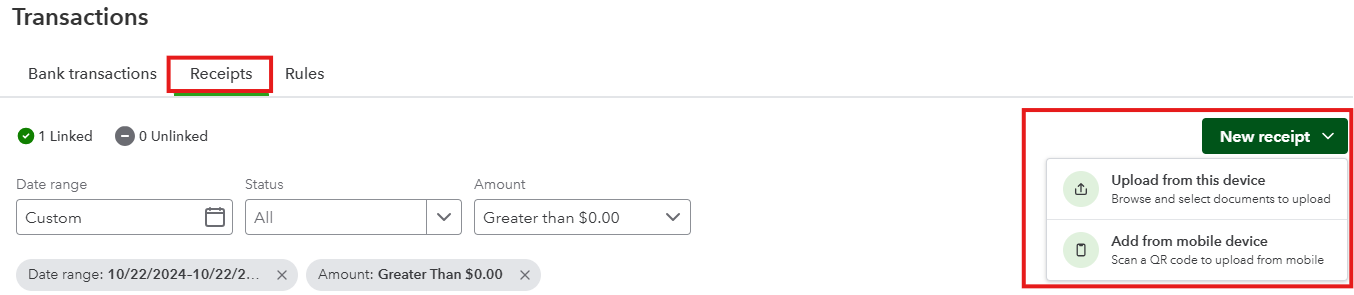

     
  5. Once uploaded, you can click the Link a transaction to create an expense transaction from the receipt.


I'm adding this article that you can read to learn more about uploading receipts: Upload your receipts.


Leave a comment below if you have questions about uploading receipts in QuickBooks Solopreneur.

Mirriam_M
QuickBooks Team

I receive a business expense receipt (i.e. airfare booking, car rental), how do I forward that to be tracked as an expense in quickbooks?

Hi Daslakson22,


I just wanted to follow up to check if the resolution we provided helped resolve your issue.


Please let us know if everything is now working as expected or if you’re still experiencing any problems.


We’ll be glad to assist further if needed.

Need QuickBooks guidance?
Log in to access expert advice and community support instantly.

Need to get in touch?

Contact us