Hello @gn,
I appreciate you for posting here in the Community. Allow me to assist you with the data you need in QuickBooks Online.
Currently, the option to show contributions and social security numbers in a single report are unavailable. As a workaround, you'll need to pull up a separate report and combine them in Excel.
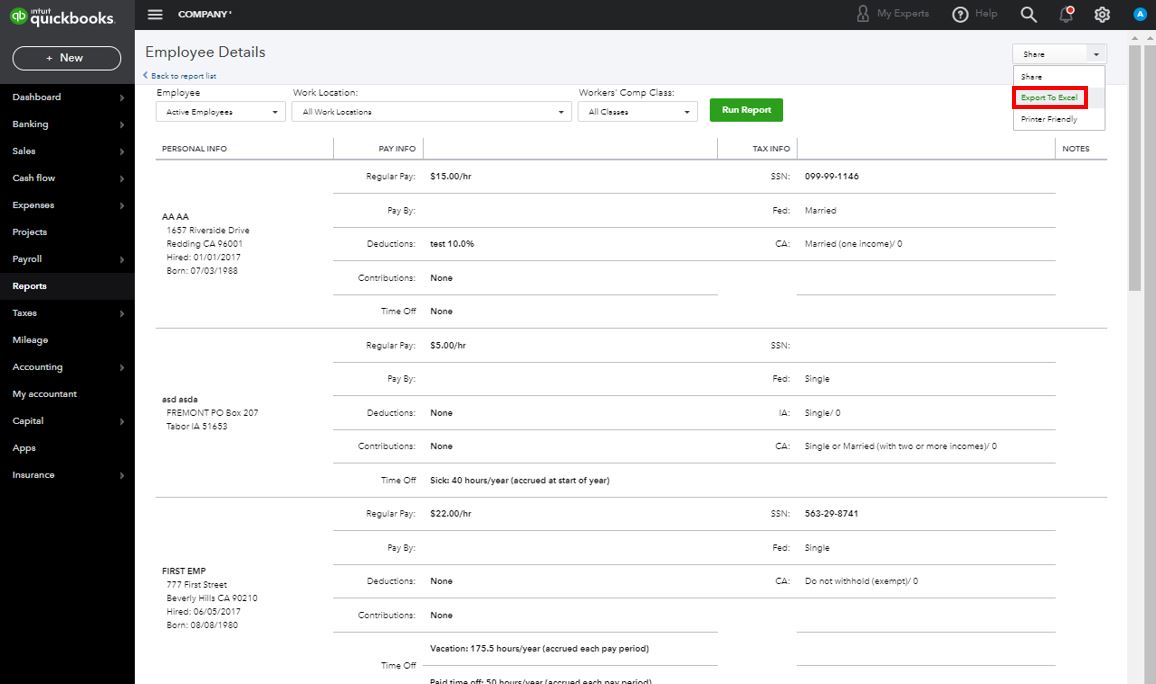
I recommend you use the Employee Details report in QuickBooks. This report shows detailed information about your employees like the SSN and other information.
You can download the data over to Excel and merge any needed info. In case you need the steps, here's how:
- On the left navigation bar, click Reports.
- Scroll down and select Employee Details under Payroll.
- Make the necessary changes to the filters.
- Press the drop-down arrow in the upper-right corner next to Share.
- Choose Export to Excel.
You can also check this article for additional guidance in personalizing reports, like how to modify the columns and display: Customize reports in QuickBooks Online.
Hit me up by adding a comment below if you have any other questions regarding the data you need. I'll be happy to help you some more.


