Turn on suggestions
Auto-suggest helps you quickly narrow down your search results by suggesting possible matches as you type.
Showing results for
We just ran our first payroll on QB Online. (long-time Desktop user) I deducted child support from our employee's paycheck. Where do I find the payroll liability to write the check? In desktop, it would show up in my liabilities and I could pay it from there. I do not see that as an option in the QBO. Can this be done?

Yes, it can be done in QuickBooks Online, brit.
I appreciate you for choosing QuickBooks products to handle your business and payroll. I understand that there are differences in interfaces and features in both the desktop and online versions. Not to worry, I'll show you how to pay the Child support to the appropriate agency.
The Payroll Taxes & Liabilities section isn't available in QuickBooks Online (QBO). We'll have to go to the Check page instead to pay the garnishment. I'll show you how:
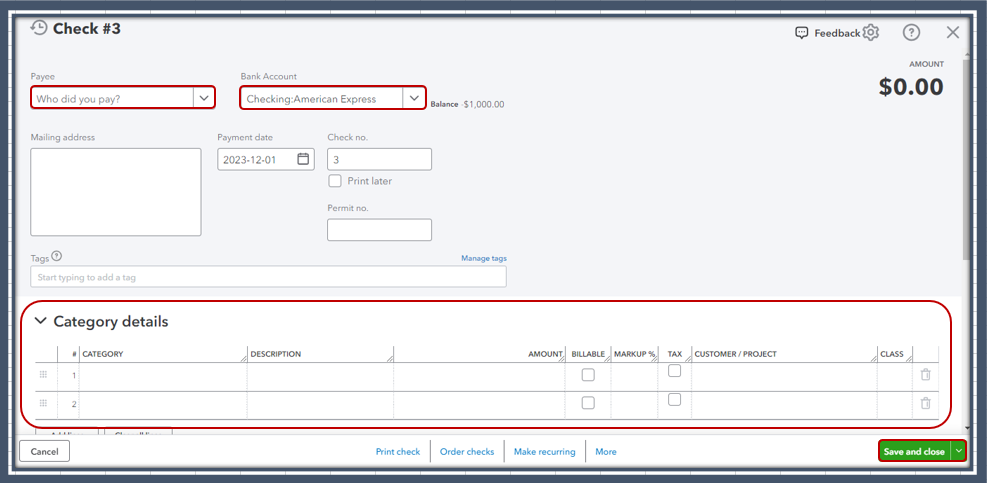
For more details about the process, please see this article: Create and Record Checks.
Please keep us posted if you need additional assistance managing payroll, liabilities, and taxes in QBO. I'm always here to help you out.
Ok, so what if I had 100 employees and they all had deductions....how would I even know how much was owed to these agencies without manually calculating these deductions? It seems ridiculous that you would not have a payroll liabilities section in QBO.
Hello there, brit.
I understand the importance of efficiently managing payroll liabilities, especially with multiple employees and various deductions.
QuickBooks Online (QBO) offers features to help you accurately calculate and track these deductions despite not having a specific section labeled payroll liabilities.
When setting up child support, we can enter the employee and agency names to recognize which agency owed the garnishment. I'll guide you on how to do it.
Once done, pay the garnishment to the appropriate agency by creating checks. You can follow the steps given by my colleague above.
Afterward, run the Payroll detail report to view created paychecks, including regular hours, amounts, taxes, and deductions.
I've added these articles that can guide you in seamlessly managing your reports. It contains details on how to memorize and export it in QBO:
Let me know if you have other questions about payroll. We'll answer everything for you.


You have clicked a link to a site outside of the QuickBooks or ProFile Communities. By clicking "Continue", you will leave the community and be taken to that site instead.
For more information visit our Security Center or to report suspicious websites you can contact us here


