There are two things that we need to check to make sure that the payments will show in your contractor's 1099s, @CareyDE.
I can help you record this payments in your contractor's 1099s form. First, we need to make sure that the track payments for 1099 box is checked in your contractor's profile. Here's how:
- Go to the Expenses menu and select Vendors.
- Click the name of the contractor, then select Edit on the top-right corner.
- Check the box for the Track payment for 1099 feature.
- Click Save.
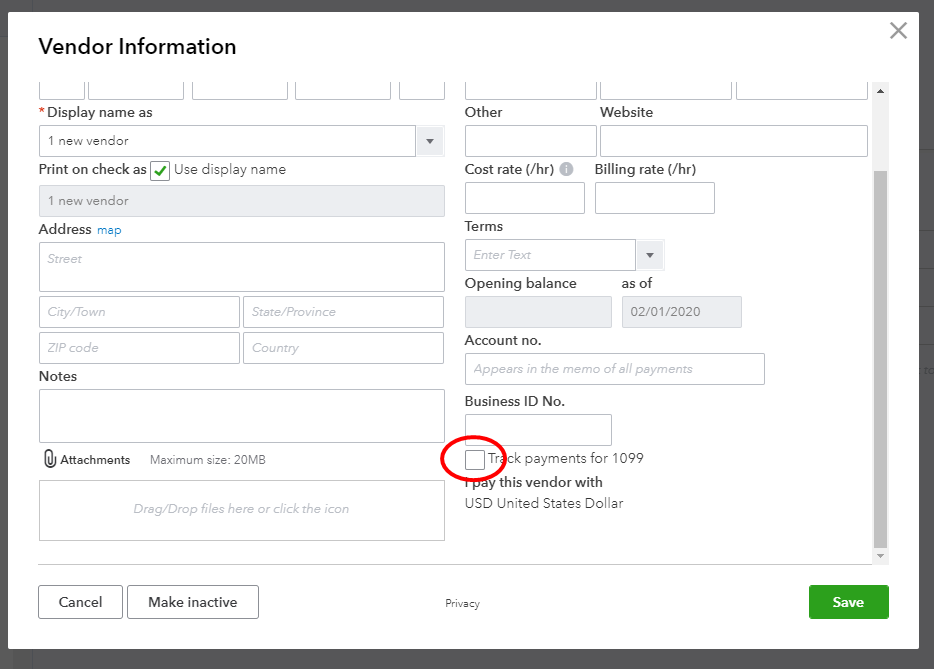
Once done, let's proceed to your 1099s section and make sure that the contractor's account is all mapped under the box 7. Let me show you how:
- Go to the Workers menu and select Prepare 1099s.
- In the Accounts sections, make sure to the check accounts associated with the contractor in the Box 7 : Nonemployee Compensation.
To ensure you get your yearly tasks done on time, you can check the Year-end guide and checklist in QuickBooks.
Please let me know if need any more help in filing your tax forms in QuickBooks. I'll get back to you in a moment.


