Turn on suggestions
Auto-suggest helps you quickly narrow down your search results by suggesting possible matches as you type.
Showing results for
Get 50% OFF QuickBooks for 3 months*
Buy nowIt was recently discovered that undistributed tips on one payroll in the past was paid to the wrong employee. I'm sure the wrong employee will give back those tips, but how do I record that deposit of returned tips and correct both of their prior paychecks? This happened in a prior quarter of this year and taxes have already been filed.
Solved! Go to Solution.

Hey there, @Apples521. I’m glad you reached out for assistance with your employees’ paychecks. Let’s sort this out together.
It looks like you entered some incorrect additions on those paychecks and they’ve already been submitted. The best course of action is to connect with our support team, as adjusting filed paychecks is beyond your control.
Here’s how you can get in touch:
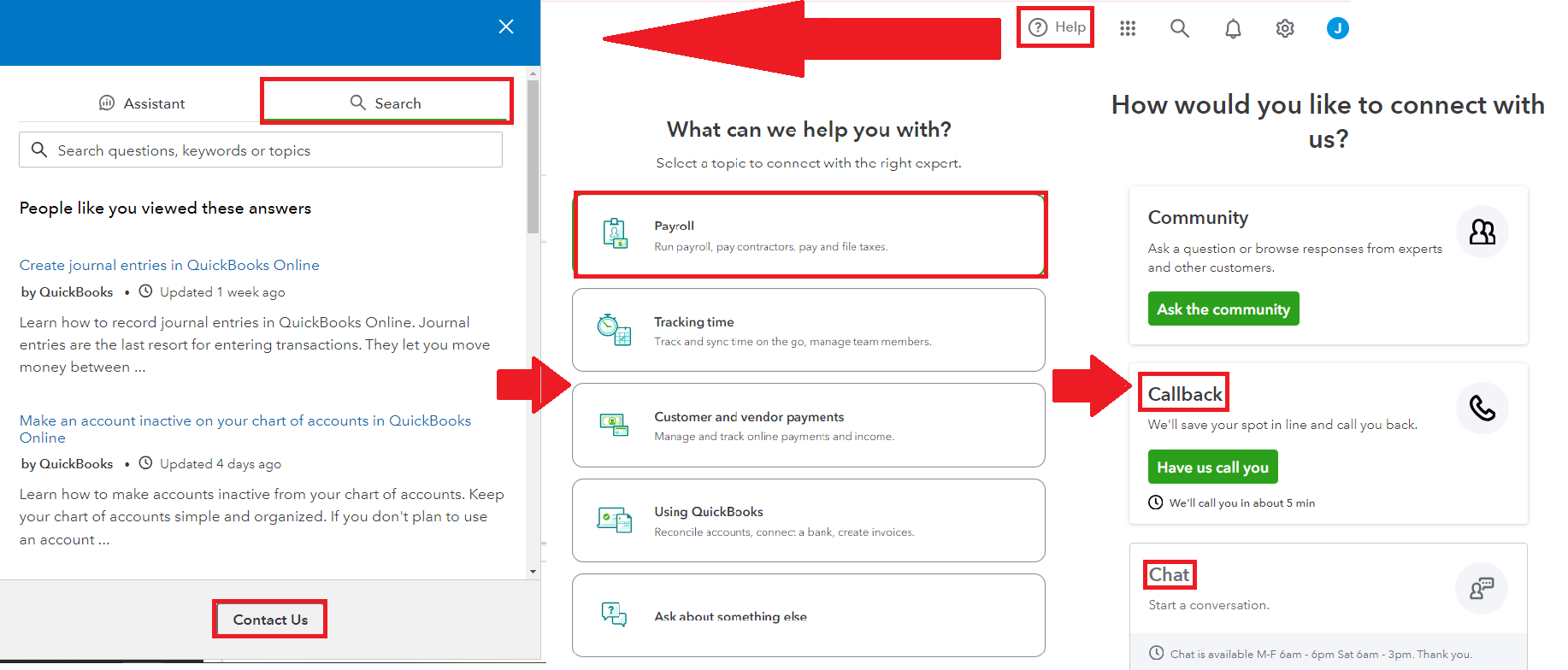
Our support hours are as follows:
If you have any more questions or need further assistance, don’t hesitate to reach out again, @Apples521. I'm here to help. Have a fantastic day ahead!
Hey there, @Apples521. I’m glad you reached out for assistance with your employees’ paychecks. Let’s sort this out together.
It looks like you entered some incorrect additions on those paychecks and they’ve already been submitted. The best course of action is to connect with our support team, as adjusting filed paychecks is beyond your control.
Here’s how you can get in touch:
Our support hours are as follows:
If you have any more questions or need further assistance, don’t hesitate to reach out again, @Apples521. I'm here to help. Have a fantastic day ahead!


You have clicked a link to a site outside of the QuickBooks or ProFile Communities. By clicking "Continue", you will leave the community and be taken to that site instead.
For more information visit our Security Center or to report suspicious websites you can contact us here


