Turn on suggestions
Auto-suggest helps you quickly narrow down your search results by suggesting possible matches as you type.
Showing results for
Get 50% OFF QuickBooks for 3 months*
Buy nowI set up the Maine PMFL with the incorrect number of employees. 1 checked 1-14, it needs to be 15 or more but I can't see how to change it. I have not issued any paychecks yet this year. Thanks.

Good to see you here, @Chris. There's no need to worry about the incorrect number of employees as I'm here to assist you in correcting this for accurate employee contribution.
Before we get started, please know that the direct way to remake the setup for the number of employees for the Maine PMFL is unavailable. However, we can adjust the policy rate to align with the rate for 15 or more employees. Then, we will manually assign this policy to any employees added.
To begin with, let's edit your policy setup first and enter a rate specific to 15 or more employees:
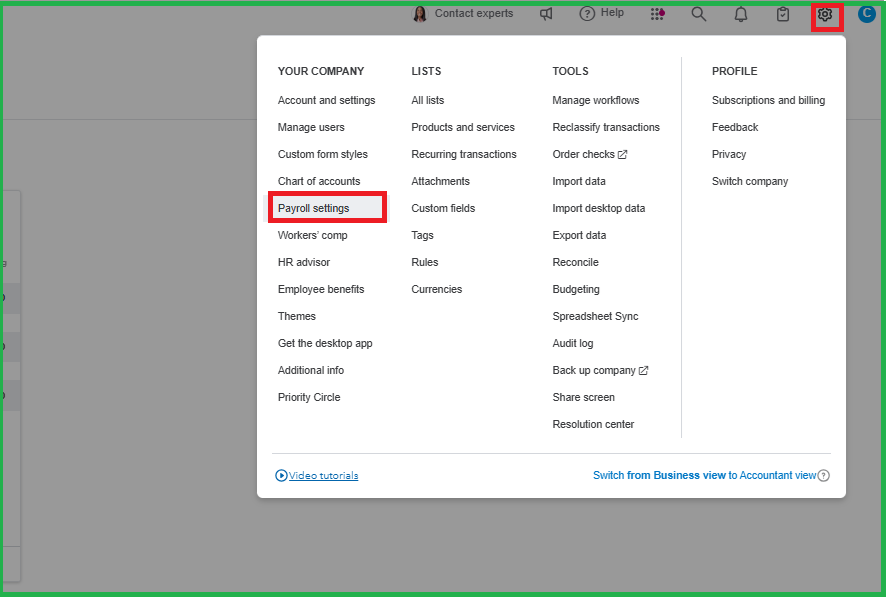
Once done, let's assign the updated policy to added employees:
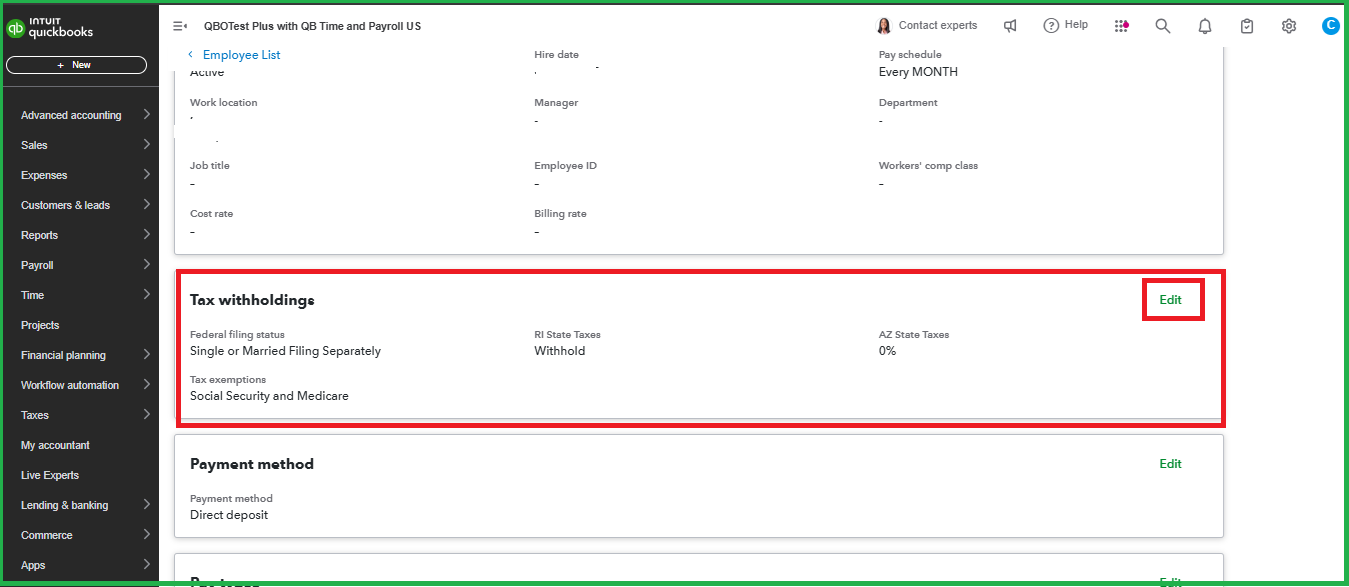
For more information about handling MPFL, please refer to this article: Set up and manage Maine Paid Family Leave.
If you want to make a specific employee exempt from Maine PMFL, you can follow the steps in the Exempt employees from Maine Paid Family and Medical Leave section in this article: Set up and manage Maine Paid Family Leave.
Need to reduce manual entries and free up your time when you set payroll to run on its own? This can be possible with automatic payroll. Our QuickBooks Live Expert Assisted is always available to assist you.
There are no limits to seeking assistance in the Community. If you encounter any problems with your QuickBooks experience, feel free to return. We're here to provide the support you deserve.
The issue is that I initially checked 1-14 employees, so it is .05% deduction.
I have over 14 employees which calls for a 1% deduction which I was going to do 50% me, 50% employee. It won't let me change it.
Policy DescriptionEffective onFamily and Medical leaveAction
| MPFL | |||
01/01/2025 Active | Employer: 0%, Employee: 50% | Edit | |
01/01/2026 | Employer: 50%, Employee: 50% |
Trying to edit it, It can only be 50% total
And I am unable to change the coverage
The system's contribution allocation policy is designed with specific access based on the number of employees registered in your account, Chris. I'll share some insights about how this policy being offered works below.
For smaller businesses or startups with fewer than 15 employees, there's a restriction on the total shared contribution percentage that can be allocated between the employer and employees. Since you've mentioned that you've just entered 14 or fewer employees into the system, you're limited to a maximum combined contribution of 50% that can be split between you and your staff. You can make use of 25% for you and 25% for your staff to have a total of 50% for both parties. This policy is in place to maintain fairness and prevent potential misuse in smaller organizations.
On the other hand, the policy changes if you reach a total of 15 or more employees. At this point, you gain more flexibility in contribution allocation. Also, this is the time when you can implement a policy that allows for a higher total contribution, including the ability to set up a 50% contribution from both the employer and employee sides, effectively doubling the potential contribution.
However, if you have already set up a total of 15 employees, yet you still weren't able to allocate 100% of the total contribution for both parties, this is a time wherein we have to do some troubleshooting steps. We can use a private or incognito window to rule out cache problems in your browser.
Here's how:
To begin, sign in to your QuickBooks Online (QBO) account in an incognito window. It will prevent the browser history from being saved.
Please refer to the following keyboard shortcuts based on your browser type:
If private browsing fixes the problem, clear your browser's cache and reboot. This applies to all supported, updated browsers. Clearing the cache removes stored data that may cause issues.
For further information about how the total contribution works in your policy, you can refer to this article: Add Maine Paid Family and Medical Leave to Employees.
Moreover, you can also read this article if you've turned on the automated taxes and forms in QBO to know the dates for filing: Year-end checklist for QuickBooks Online Payroll.
I hope this helps you navigate the contribution allocation system, Chris. Please know that you can always revisit this thread if you have further clarifications about your PFML policy in QBO. We're always here to help.
Hi JaneDave
These solutions did not work. I even tried a different browser. I set it at 1-14 by mistake, it needs to be 15+ because the contribution rate is .5% for 1-14 and 1% for 15+. It won't let me change the number of employees and the option to delete the policy is grayed out. I don't see where to add a 2nd policy to set up correctly and ignore the existing one.
Thanks,
Chris
Mishaps occur, Chris 9. I'm here to help you fix the problem with the employee count and contribution rate settings by directing you to our QuickBooks live support.
Here's how you can reach out to them:
I added this article where you can learn more about setting up up QuickBooks Payroll to track paid family and medical leave in Maine: Set up and manage Maine Paid Family Leave.
Additionally, you can explore ways to conclude this year's payroll and gear up for the upcoming year using QuickBooks Payroll: Year-end checklist for QuickBooks Online Payroll.
Feel free to continue posting or replying in this thread if you need further clarification on your PFML policy within QBO Payroll. We're here to help whenever you need us.
Online help had the solution
By deleting 2026 you are then able to edit 2025


You have clicked a link to a site outside of the QuickBooks or ProFile Communities. By clicking "Continue", you will leave the community and be taken to that site instead.
For more information visit our Security Center or to report suspicious websites you can contact us here


