Turn on suggestions
Auto-suggest helps you quickly narrow down your search results by suggesting possible matches as you type.
Showing results for
Get 50% OFF QuickBooks for 3 months*
Buy nowHello All,
I have QBO Payroll core. There are 4 times of paid time off, vacation, pto, sick, and unpaid. Does anyone know if the categories can be renamed, or a new one added? I want to add School Activities and have it show up on the paystub.
Apologies for the short and crude post, I've posted this 5 times now and keep getting an error on the posting. Having typed it multiple times, my patients have ran dry.
Thanks.

Hi Adam73647, great to have you here! I apologize for the frustration you've experienced due to the technical errors while trying to post in the community. I understand you’re looking to add or rename a category, specifically to include “School Activities” on paystubs. Let’s explore the options available in QBO Payroll Core for managing paid time-off categories.
In QuickBooks Online Payroll (QBOP), the ability to customize paid time-off categories is unavailable. You cannot rename the existing categories or add new ones directly within the system. The four standard categories (vacation, paid time-off (PTO), sick, and unpaid) are default options, but you can create new custom policies.
You could use one of the existing categories, such as PTO, to track School Activities time-off. However, you’d need to keep separate manual records to distinguish between regular PTO and School Activities time.
Here’s how:
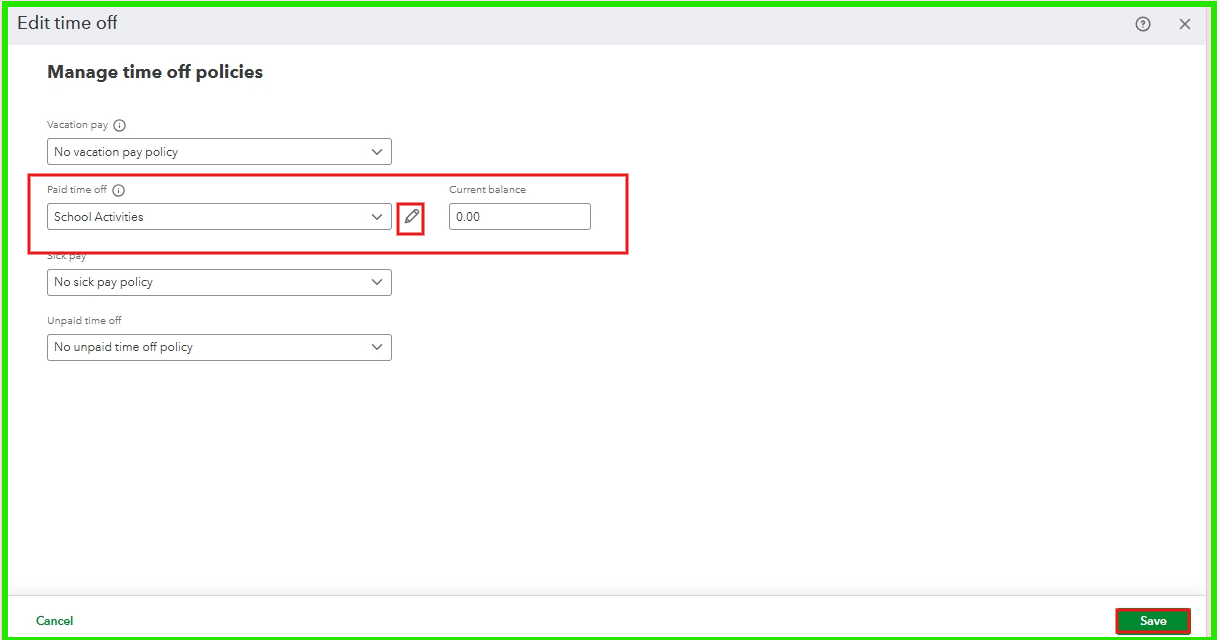
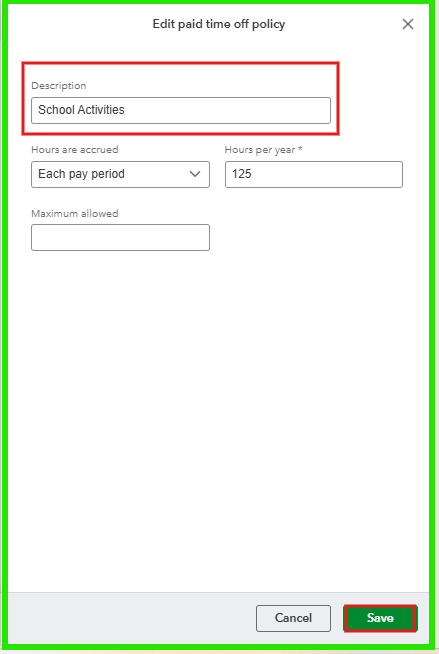
For further information on setting up and tracking time off, check out this article: Set up and track time off in QuickBooks Payroll.
Once you've had a chance to try the suggestions, let me know how it goes! I want to ensure everything is resolved for you. If you have additional questions as you work through your transactions in QuickBooks, don’t hesitate to reach out. I’m here to help!
ZuzieG,
Thanks for taking the time to reply. This is exactly what I did, but I was hoping to change the name so it would display as School Activity for the employee, as to not cause confusion. The way it stand they'll have PTO and Vacation.
Hello there, Adam.
I understand how important it is to include school activities on your paystub. Therefore, I encourage you to share your ideas through our feedback channel.
In QuickBooks Online Payroll, our product engineers are actively accepting suggestions to improve the product and better meet customer needs. Your feedback is incredibly important to us, and our team will carefully consider it for future software updates.
Here’s how you can share your suggestion:
Feel free to return to this thread if you have any additional questions. We’ll be happy to assist you further.


You have clicked a link to a site outside of the QuickBooks or ProFile Communities. By clicking "Continue", you will leave the community and be taken to that site instead.
For more information visit our Security Center or to report suspicious websites you can contact us here


