Get 50% OFF QuickBooks for 3 months*

Buy now
Switch to QuickBooks and 70% off for 3 Months
December 17, 2018
Solved

Payroll check issue

  • December 17, 2018
  • 2 replies
  • 7 views

I printed a payroll check and paid the liabilities already.  The employee hasn't received the check yet.  My boss decided he wants to change the check to a lower amount - these are bonus checks done through payroll.  How will I be able to handle this with the IRS and NYS when I paid the liability.  I am running a regular payroll, payable on Thursday.  Could I make my negative adjustment on those liability payments?  I have 3 days to pay my liability.  The bonus check and liability for the bonus payroll was done today.

Best answer by HoneyLynn_G

Hi there, @VickiK.


Thank you for visiting us today. I can help you correct the payroll check of the employee.


You can edit the payroll check to correct the amount and its liability. I'll show you how:

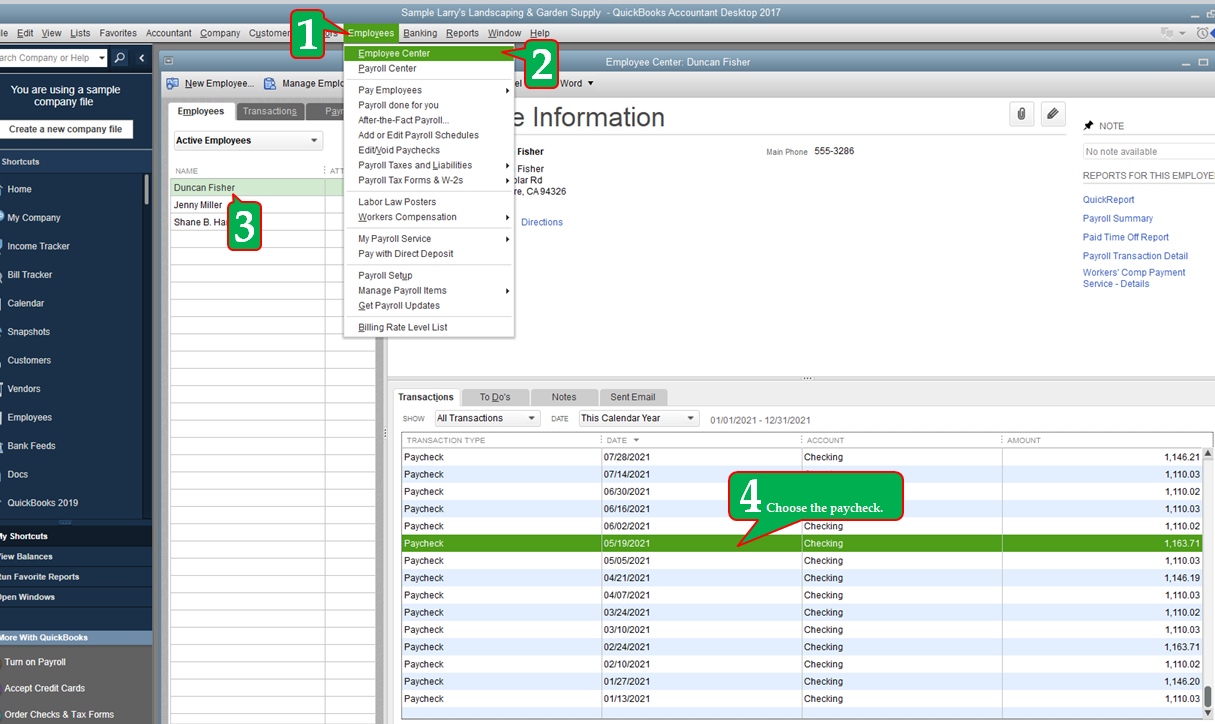
  1. Click Employees.
  2. Choose Employee Center.
  3. Select the employee name.
  4. Under the paycheck list, choose the paycheck.
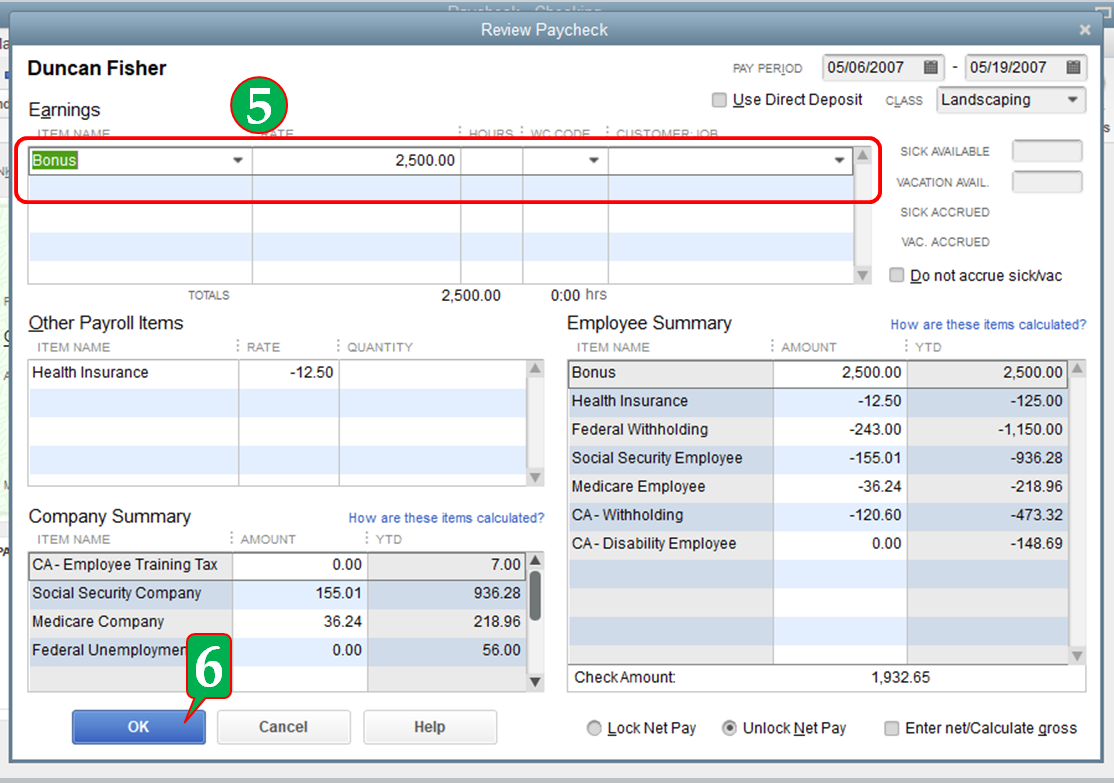
  5. Update the bonus amount.
  6. Click OK to save the changes.

After updating the payroll check amount, this will automatically reflect on your Pay Liability section. Once QuickBooks recognize the over-payment, you have two options in resolving it. Either applying the over-payment to a future tax liability period or marking the over-payment for a refund. 


This information should keep you going today.


Just add a comment below if you have additional question about payroll. I'd be happy to offer further help. Have a wonderful day.

2 replies

December 17, 2018

I would check with your accountant.  You can always make an adjustment on the next liabilities payment.  Void the check and redo.  I'm in Mass so I am not sure about NY and how their Liability payments are made.  MA is a week out to make adjustments before the payment is do.  

VickiKAuthor
December 19, 2018

Thank you for replies.  I did adjust the check and QB automatically adjusted my current amount to pay by that overpayment from the bonus payroll.  I appreciate your help!

HoneyLynn_G
Level 6
December 17, 2018

Hi there, @VickiK.


Thank you for visiting us today. I can help you correct the payroll check of the employee.


You can edit the payroll check to correct the amount and its liability. I'll show you how:

  1. Click Employees.
  2. Choose Employee Center.
  3. Select the employee name.
  4. Under the paycheck list, choose the paycheck.
  5. Update the bonus amount.
  6. Click OK to save the changes.

After updating the payroll check amount, this will automatically reflect on your Pay Liability section. Once QuickBooks recognize the over-payment, you have two options in resolving it. Either applying the over-payment to a future tax liability period or marking the over-payment for a refund. 


This information should keep you going today.


Just add a comment below if you have additional question about payroll. I'd be happy to offer further help. Have a wonderful day.

March 16, 2021

Would a similar answer be given if the check was a regular payroll check? The issue was that the overtime hours were over by 13:07. So if I open the paycheck & change the hours, it says that it's not in balance. What can I do?


Paycheck printed, but not given out & liabilities to state (NJ) paid already.


Using QB Desktop Pro 2020 with Enhanced Payroll


Thanks in advance! 

Level 9
March 16, 2021

Hello there, PizzaPlus. Thank you for joining here.


You have options to choose on how to handle the payroll liability payment in QuickBooks Desktop. My colleague already shared the information about it. Please view the complete details in this article: https://quickbooks.intuit.com/learn-support/en-us/employees-and-payroll/made-a-mistake-on-a-payroll-check-have-paid-payroll-taxes/00/818569.


Also, you can check this link for more details about reducing paycheck wages for an employee who has been overpaid. 


Visit again if you have other concerns. The Community is always here to help. Take care always.