To directly summarize payroll based on the employee's title or department is not available by default, Dkretzer. However, there is a workaround to achieve this by utilizing the Class feature. By adding the employee's title or department as a class within the system, these classifications will then be reflected and can be filtered in the payroll reports. Let me elaborate on this.
To clarify, when you assign titles or departments as classes to your employees with payroll transactions, this enables a customized view of your payroll reports. This setup allows for a tailored view of payroll based on departmental or job title lines.
1. Navigate to the Edit menu then Preferences.
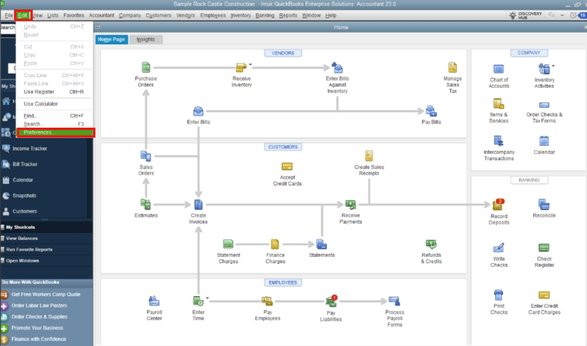
2. Choose Accounting and then Company Preferences.
3. Click on Use class tracking for transactions.
4. If prompted, select OK to save the changes.

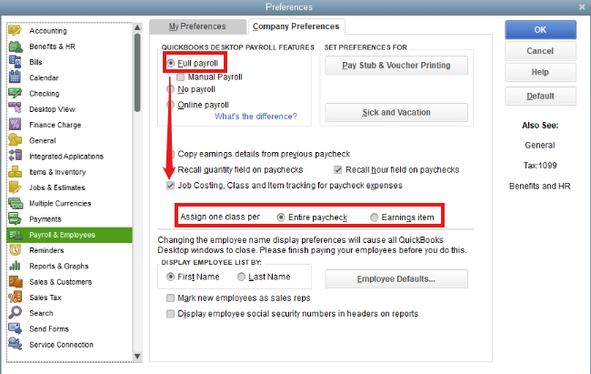
5. Hover over to Payroll & Employees.
6. Ensure that Full Payroll is active under QuickBooks Payroll Features.
7. Tick on Job Costing, Class, and Item tracking for paycheck expenses.
8. Decide how to assign classes
9. Hit OK to finalize settings.
For additional details, refer to this article: Set up and use class tracking in QuickBooks Desktop. The report also guides you on how to customize it so you can view the class information effectively.
However, if adding classes doesn’t suit your needs, another option is to export the payroll report from QuickBooks to an external format such as Excel. Once exported, you can manually group or categorize your employees by their department in the spreadsheet, allowing you to customize the data presentation according to your specific requirements.
Furthermore, here's a resource you can use to create, access, and modify memorized reports in QBDT: Create, access and modify memorized reports.
The instructions provided will help you effectively customize your payroll data, Dkretzer. If you have any further questions or need additional assistance, please don't hesitate to reach out. I'm here to ensure that everything goes smoothly for you. Have a wonderful day ahead!


