Turn on suggestions
Auto-suggest helps you quickly narrow down your search results by suggesting possible matches as you type.
Showing results for
Get 50% OFF QuickBooks for 3 months*
Buy nowI pay payroll taxes manually and record the payments in Taxes/Payroll Taxes in QB online (I do NOT use the QB E-Pay). By doing this, when the payment clears the bank in the bank feed, it matches with the recorded tax payment in QB. Last week, I paid a state tax 1 day late which incurred a penalty. When I go to record the tax payment under Taxes/Payroll Taxes, there is no where to enter the penalty fee. How do I record the tax payment and include the penalty fee so that it will Match once the payment clears the bank?

Hello there, BCM65.
I'm here to share information about recording a penalty fee for late payroll tax payments in QuickBooks Online (QBO).
When dealing with penalties paid to tax agencies, you can record them as an expense in QBO. Recording the penalty fee and the payroll tax due together will result in an overpayment.
To record an expense, here's how:
For detailed information, kindly visit: Recording prior tax payments.
Moreover, I'll also share this article that can serve as your reference if you want to learn how to view payroll tax payments and forms in QuickBooks: Access payroll tax forms and tax payments.
Feel free to leave a reply if you require further assistance with recording tax penalties in QuickBooks. The Community team always has your back. Have a good one.
So, why is there no way to adjust a payroll tax returns in QBO like you can in the desktop version. This answer will create two entries, where the taxing entities require that tax and penalty be paid at the same time, one entry. Now the bank feed matching does not work. Is this something that can be fixed?
Hello there, @DianeV. I appreciate you taking the time to raise your concern here in the Community.
QuickBooks Online (QBO) and QuickBooks Desktop (QBDT) are different platforms, which is why most of the features offered differ on both products. I recognize how convenient it is to have the option to adjust payroll tax returns manually. However, it is unavailable in QBO.
Also, QBO has a different way of adjusting payroll tax returns, in which you need to contact our QuickBooks Online Payroll Support Experts as they're the ones who'll do it for you.
Moreover, if you have recorded the transactions as an Expense or a Check, you can directly use the Find match option to match your bank entry with the total amount of the payroll tax payment and its penalty. Here's how:
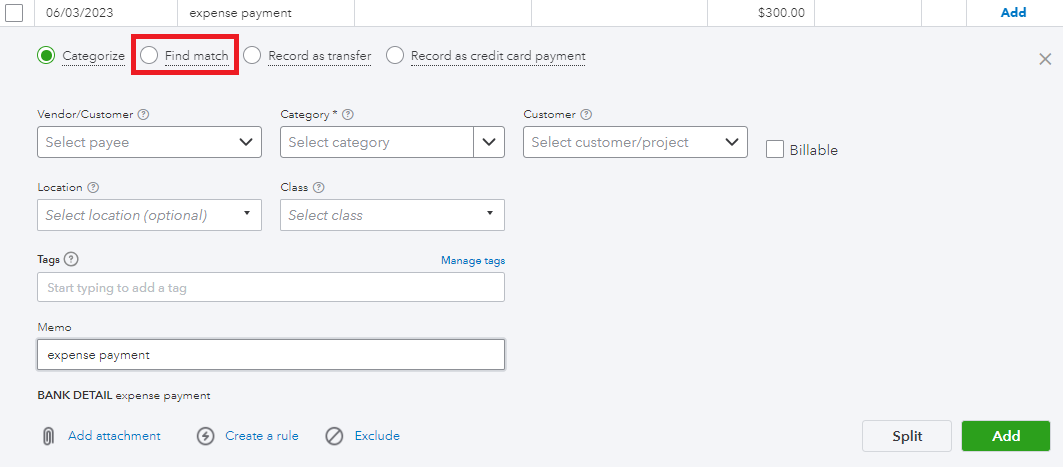
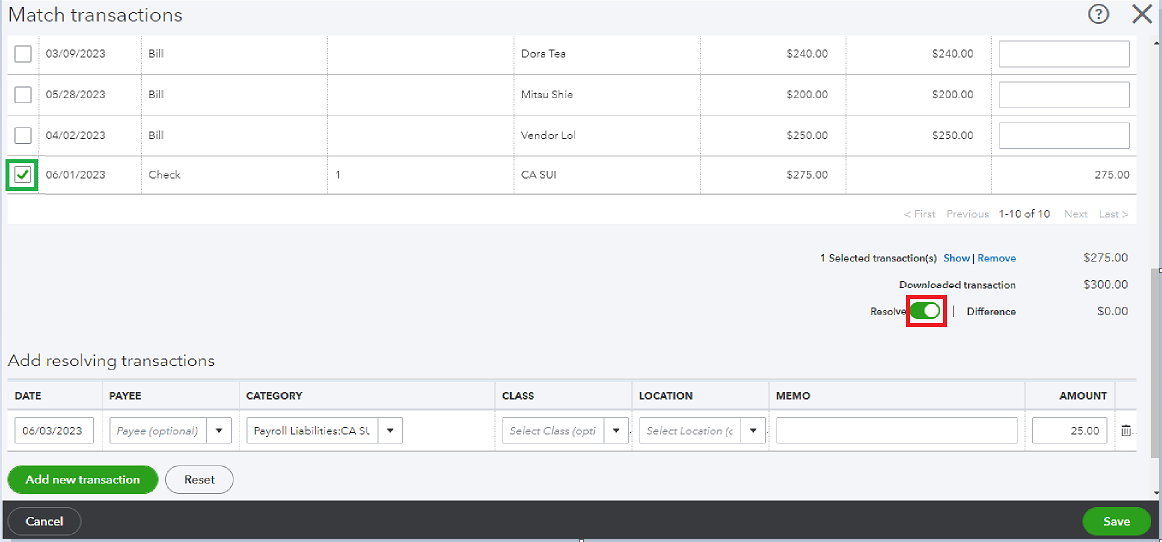
Additionally, I'll also share this article that can serve as your reference if you want to learn how you can wrap up this year's payroll and prepare for the next with QuickBooks Online Payroll: Year-end checklist for QuickBooks Online Payroll.
Feel free to leave a reply if you have additional QuickBooks-related queries. The Community team always has your back. Have a good one.


You have clicked a link to a site outside of the QuickBooks or ProFile Communities. By clicking "Continue", you will leave the community and be taken to that site instead.
For more information visit our Security Center or to report suspicious websites you can contact us here


