I'm here to make sure the employee's federal taxes will deduct from his/her paycheck, kim.
Do you know if these employees are meeting the wage bases set by the IRS? You can click on this link to learn the wage base limit: Topic No. 751 Social Security and Medicare Withholding Rates.
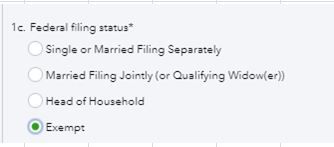
It is also possible that their W-4 status has been set to 'Do Not Withhold' by mistake. Here's how to check if an employee was set to Do Not Withhold (Exempt):
- Navigate to the Payroll menu and select the Employees tab.
- Click the name of the employee.
- Under the What are [employee's name] withholdings section, click the Pencil icon.
- Make sure the federal status is not Do No Withhold (exempt).
For more information about the process, check out this article: 0.00 or no income tax withheld from paycheck.
Once you've verified that the set up is correct, I suggest checking the Payroll Tax and Wage Summary report. It shows detailed information about how QuickBooks calculates tax amounts on employee paychecks and the wage base limit for each employee's tax.
Let me guide how:
- Go to the Reports tab located on the left pane.
- Type Payroll Tax and Wage Summary in the search box and press Enter.
- Modify the date range and click Run Report.
- Click the Federal Income tax under Federal Taxes (940/941).
For the detailed guide, you can use this article: Payroll tax wage bases and limits.
Please let me know if you need further assistance with payroll. I'm always around to help. Have a good one.


