Get 50% OFF QuickBooks for 3 months*

Buy now
cancel
Showing results for 
Search instead for 
Did you mean: 
Announcements
Simplify payday and set payroll to run automatically on QuickBooks. Explore QuickBooks Payroll
WrtJosh
Level 1

QBD Checks Randomly Print Wrong

I have a customer who has the most baffling issue with their checks.  They use checks with two pay stubs and most of the time these print out correctly.


However in the middle of a batch of checks, it will put a page break after the main check and will then print the paystub over top of another check, ruining it and messing up the whole batch from then on as it assumes that those two pages were only 1 check, putting all the check numbers off by 1 every time it happens.


I cannot reproduce this on command.  The same check will print wrong one time, then print just fine the next.  I have no idea if this is a printer issue or a Quickbooks issue and I don't know where to start to troubleshoot this since, again, I can't reproduce it on command.


If anyone has any tips to start troubleshooting this issue I would appreciate it.  My customer is getting increasingly irate that he is now weeks behind on his payroll because of this issue.

1 Comment 1
Tori B
QuickBooks Team

QBD Checks Randomly Print Wrong

Thanks for reaching out, @WrtJosh.


I hope you're having a great day so far. 


Since this issue is happening randomly, let's try using our Print and PDF repair tool. I'm including some steps to walk you through the process below.


  1. Close QuickBooks.
  2. Download the most recent version (1.6.0.5) of the QuickBooks Tool Hub. Save the file somewhere you can easily find it (like your Downloads folder or your Windows desktop). Note: If you've installed Tool Hub before, you can find out which version you have. Select the Home tab. The version will be on the bottom.
  3. Open the file you downloaded (QuickBooksToolHub.exe).
  4. Follow the on-screen steps to install and agree to the terms and conditions.
  5. When the installation finishes, double-click the icon on your Windows desktop to open the tool hub.

ToolHubIcon_QBDT_US_Ext_051320.jpg

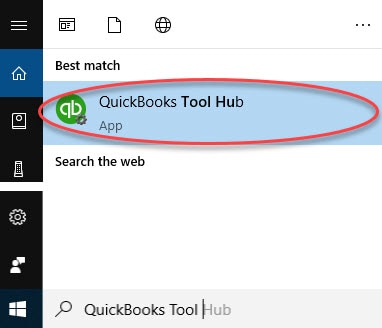
Note: If you can't find the icon, do a search in Windows for QuickBooks Tool Hub and select the program.

ToolHubSearch_QBDS_US_Ext_051320.jpg

Step 2: Use the Print and PDF Repair tool


  1. In the QuickBooks Tool Hub, select Program Problems.
  2. Click on QuickBooks PDF & Print Repair Tool. It'll take about a minute to run.
  3. Try to print or save as a PDF from QuickBooks Desktop again.


That should do the trick. For more information and troubleshooting steps, check out Fix printing issues in QuickBooks Desktop


If you continue to have issues, please let me know. Have a great day! 

Need QuickBooks guidance?
Log in to access expert advice and community support instantly.

Need to get in touch?

Contact us