In QuickBooks Online (QBO), Lam, payroll transactions may sometimes appear in unexpected accounts. This usually happens due to payroll settings or mapping configurations.
To help you address this issue, let’s clarify what you mean by "account" and guide you through the process of verifying the location of your payroll transactions. This includes checking Payroll settings, the Chart of accounts, and the associated bank account.
Could you clarify if:
1. You can't see the direct deposit in your bank account? Please note that payroll transactions typically take about two business days to process, so make sure sufficient time has passed for it to appear.
2. You are unable to see the payroll transaction—whether through Direct Deposit or Paper check—in your Chart of accounts?
If so, follow these steps:
1. Check your Bank Register in QBO to verify if the transaction is recorded there, as payroll transactions may be posted to a different bank account.
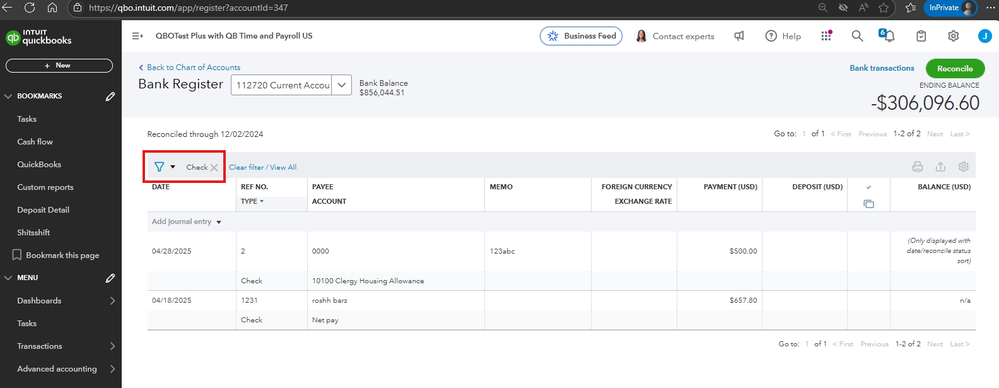
2. Review how payroll transactions are mapped in your QBO Payroll settings to determine where they are posted.
Here's how:
- Go to Payroll, and select Employees.
- Click the employee you want to review, then go to the Paycheck list.
- Click on any payroll transactions.
- The details will show which bank account the payroll is posted to.

If necessary, we can adjust the posting details or create a journal entry (JE) to correct the transaction.
Before we wrap up, I suggest you explore QuickBooks Live Expert Assisted to streamline your accounting, maintain precise financial records, and access professional support. This could free up valuable time, allowing you to concentrate on expanding your business.
The Community is always here to help if you have any additional concerns.


