Turn on suggestions
Auto-suggest helps you quickly narrow down your search results by suggesting possible matches as you type.
Showing results for
Get 50% OFF QuickBooks for 3 months*
Buy nowIs there a summary version of the Time Activities by Employee Detail report? I can't seem to find it in the standard reports, and I can't figure out a way to do it inside the detail report. I would love all of the information in a summary version that's not 99 pages long. I don't need it to show every entry for every customer, just the total time for each customer, subdivided by employee.

Hi there, @SarahCO.
I appreciate your effort in reviewing the Time Activities by Employee Detail report.
QuickBooks Online doesn't have a summarized version of the Time Activities by Employee Detail report. The detail view will always list every individual time entry.
As a workaround, you can export this report to Excel and create a pivot table with 'Customer' as rows, 'Employee' as columns, and 'Duration' as the summed value. This produces a clean summary of total hours per costumer, broken down by employee.
If you're using QuickBooks Time, you can also run the Itemized Total Time report. That one provides a summarized view without showing every individual entry.
If you have follow-up questions, please don't hesitate to click the Reply button.
Thanks for your response.
I've never created a pivot table in Excel, so I wouldn't even know how to start with that. In addition, I also need it subdivided by class. Also, Excel doesn't add the times, now that Quickbooks enters the times in the report as 1:30 hours instead of 1.5 hours. This is what got me in this pickle to begin with.
I found the itemized total time report, but it doesn't seem to be working correctly. It is only showing me time for one employee, and not even all of his time.
Hi there, Sarah.
Thank you for reaching out and sharing details about your situation with QuickBooks Online (QBO). Allow me to help you with this issue.
We can refine the data in the Itemized Total Time Report by applying the correct filters when running the report to group and subtotal your data properly. Ensure you apply filters for Team Members, Jobs, or Customers, as well as any Custom Fields, such as billable items, service items, or classes. This step is crucial to ensure the report captures all the relevant data you need.
For the Team Members filter, ensure "Include All Team Members" is selected. Entering a specific name might inadvertently exclude others. Select any relevant job codes or customers tied to your report and verify that class data is included to allow subdivision.
As for the times in the report as 1:30 hours, tick the radio button for Decimal (4.75) to choose decimal form instead of HH: MM (4:45).
Use the "View Timesheets" option to verify that the data matches your expectations. If the report still seems incomplete, download the timesheets as a .csv file to work in Excel.
You can refer to this article for detailed instructions on how to run the itemized total time report: Run the Itemized Total Time Report for QuickBooks Time.
If you require further assistance with running or modifying these reports, please let us know. We are here to help you.
The itemized total time report is still only showing one employee, even though I made sure all employees are selected. Is this only for if employees are entering their time themselves? We don't have that set up yet, because Quickbooks has made it so difficult to get it going, and I don't have the time to jump through all the hoops they make me jump through. So, we are still entering time manually with the weekly timesheet. But the one employee who is showing a few hours is someone we've had practice entering time through Quickbooks.
Is there a way in regular reports for it to show time as a decimal? I had looked and couldn't find anything. If so, I could at least make do with downloading the Time Activities by Employee Detail Report into Excel.
Hi SarahCO.
Thank you for your questions about the Itemized Total Time report and decimal formatting. Here's a quick explanation of how time reporting works in QuickBooks Online.
The Itemized Total Time report only includes hours entered through the Time module, such as Time > Weekly Timesheets or Single Time Activities. If hours are manually added elsewhere, like during payroll processing, they won’t appear in the report, as QuickBooks pulls data exclusively from the Time module.
Additionally, QuickBooks Online time reports display hours in hour : minute format by default and don’t offer a built-in option to use decimal formatting. Your approach to exporting the data to Excel and converting it is a great workaround that provides flexibility.
If you have further questions or need assistance, feel free to reach out. We’re happy to help.
We have always entered time by going to "create" then "weekly timesheet." I wasn't aware that there even was another way to manually enter time other than "create" then "single time activity." When I go to "Time", I don't see an option for "Weekly Timesheets." Why would create/weekly timesheet not take me to the same place?!? This is unbelievably frustrating to find out that we have been doing it incorrectly for LITERALLY YEARS! It makes no sense to me that you would have two different ways to enter time? I thought the "Time" tab was for when employees are entering their own time, and Quickbooks has made that so hard that I haven't been able to get it set up yet.
In addition, every report I ran for employee time up until this last one gave me time as a decimal. So, it was definitely not default. It was changed. And it DOES NOT work in Excel. I can't convert the time to decimal and I can't add it in Excel the way it is. The report that I have run and saved in Excel NO LONGER works in Excel, because Quickbooks changed it to no longer give me the data as a decimal.
I have been unhappy with Quickbooks online since DAY ONE, and it keeps getting worse and harder to work with.
I never got a response to my last comment. Are you telling me that there's no way to even export the report to excel in a way that the time can be addes? So Quickbooks went from having a semi-functional report that I could make do in Excel to a completely non-functional report, and there's no way around it?
Hello, @SarahCO.
I understand the importance of accurate manual time entry to your workflow. Yes, we can export the Itemized Total Time report and manually convert the times to decimal hours.
Please ensure to select Decimal and check the Hours box so the timesheet you download includes decimal hours.
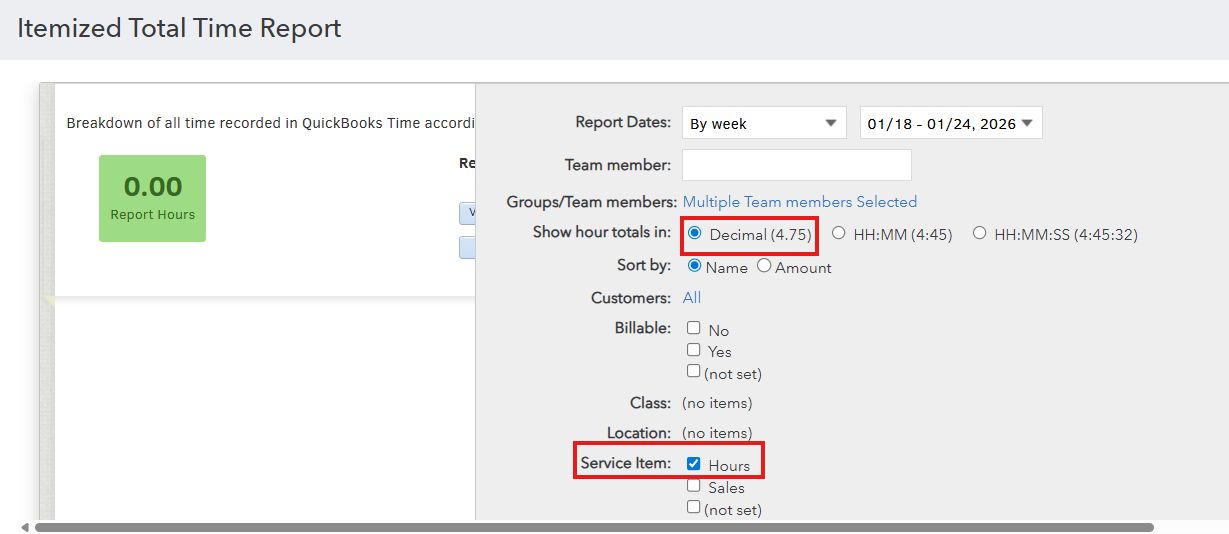
After running the report, click Download Timesheets (.csv), open the file in Excel, and edit the time entries as needed.
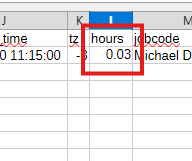
Let us know if you have further questions, we'll be right here to help you anytime.
Thank you for your response, but as I stated above, the “itemized total time report” doesn't work for me, because I've been entering time using "create" then "weekly timesheet," which apparently I should not be doing. I have no idea why Quickbooks would provide a way to enter time that it then would not use to create the itemized total time report. I’m just finding this out now, after years of using the weekly timesheet under create. I had no idea that was wrong, and I don’t even understand how they could possibly give me that as an option when it doesn’t allow me to track time properly.
The report I had been using in the past was “time activities by employee detail” under standard reports. But it now only provides time with hours and minutes, instead of a decimal. In the past it has always given me the time in a decimal format. In order to use that report in the past, I’ve had to download it to Excel, because I need to re-sort and re-add the information. But now when I download it to Excel, it can’t add the time because it’s in hours and minutes, not decimals. As far as I can tell, there is no way for me to change it to decimals before downloading it to Excel.
Or did I misunderstand what I was told in past comments? My understanding is that I can’t use the “itemized total time report” because I didn’t enter time correctly and I can’t use Excel because there’s no way to change the “time activities by employee detail” report to show the time as a decimal. So there is no way for me to get the report that I need.
I’m getting really frustrated at how hard Quickbooks online is making everything. I just want the same report that I have downloaded to Excel multiple times in the past, and I can’t even get that.
Hi there, SarahCO.
I understand how frustrating this situation must feel, especially when dealing with changes in the time format and challenges with generating the reports you need. Let me provide some clarity on what’s happening and offer the best options moving forward.
To clarify the confusion you received earlier: The Itemized Total Time Report is actually a QuickBooks Time (formerly TSheets) report, not a standard QBO report. It only shows time entries that exist in QuickBooks Time specifically. When you enter time using +New > Weekly Timesheet in QBO, those entries stay in QBO only. They don't automatically appear in QuickBooks Time unless you have both products integrated.
It's important to note that you didn’t do anything wrong; both time entry methods are completely valid for QBO purposes. The issue arises because different reports pull data from different sources.
Right now, there’s no way to retroactively convert Weekly Timesheet entries into QuickBooks Time activities for reporting compatibility. If you need to rely on the Itemized Total Time Report in the future, I’d recommend integrating QuickBooks Time and logging time directly through that tool to ensure full compatibility.
Since you've been successfully using the Time Activities by Employee Detail report for years, and it recently changed format, I'd encourage you to submit feedback about this, as customer input helps guide future updates.
Here's how:
Please leave us a response if you have other questions or concerns.
Thank you, Dandie_A. I did already submit feedback, although I'm not sure what good it does, because I never see any improvements based on feedback I suggest. Unfortunately, even if they do listen to my feedback for the first time ever, that doesn't help me with the report that I need to generate now, which is apparently impossible at this point in time.
I just don't understand how Quickbooks can be constantly changing, and NONE of their changes are for the better. I have been a loyal Quickbooks customer for decades, and I am ready to find a different platform to use, since Quickbooks makes everything so hard now. How much longer do I stick around hoping they improve things, when every change makes it worse?


You have clicked a link to a site outside of the QuickBooks or ProFile Communities. By clicking "Continue", you will leave the community and be taken to that site instead.
For more information visit our Security Center or to report suspicious websites you can contact us here


