Welcome to the Community, George. Yes, SIMPLE IRAs are supported retirement plans in both QuickBooks Online (QBO) and QuickBooks Desktop (QBDT).
To set them up, please follow the steps below:
- Go to My Apps, then select Payroll, and Employee.
- Select the employee profile.
- Once done, scroll down and click Start/Edit from the Deduction & contributions tab.
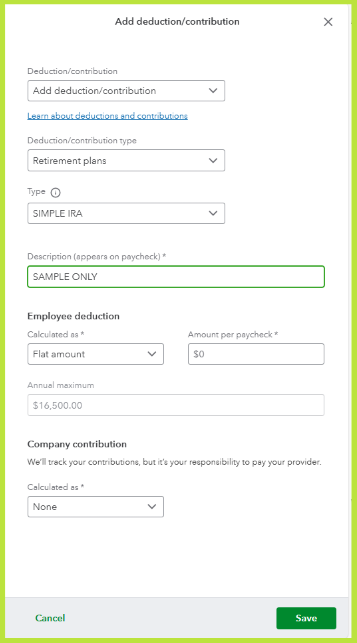
- Click + Add deduction/contributions.
- In the Deduction/Contribution dropdown, choose + Add deduction/contributions.
- Then, select Retirement plans,in the Deduction/contribution type dropdown.
- Choose the appropriate retirement plan in the Type dropdown.
- After that, add the necessary information.
- Once done, click Save and Done.
Once done, the contributions will be automatically applied during payroll runs and will show in your Payroll Summary reports and tax forms.
Additionally, you'll have the option to modify the amount of your contribution when processing payroll. For more details, please refer to this article: Set up or change a retirement plan.
You're always welcome to post in this forum if you have other concerns or questions.


