Welcome to QuickBooks Community, @carolina-drainge. I'll be happy to walk you through locating your 941 form in QuickBooks Online (QBO).
If you're set up to pay and file your 941 electronically in QBO, you can go to the Payroll Tax Center to preview current tax forms. Here's how:
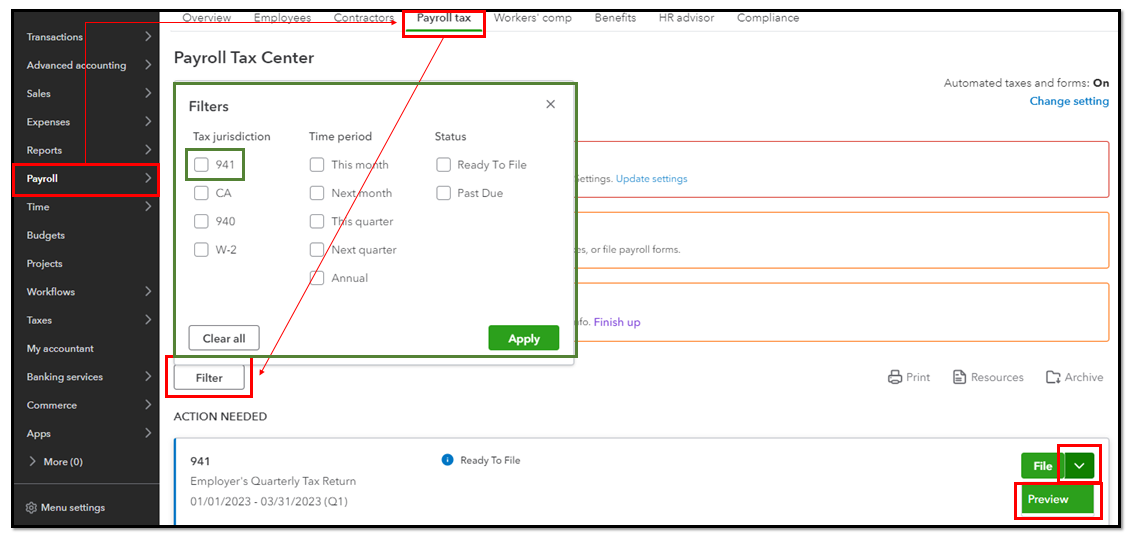
- Go to Payroll and select Payroll Tax.
- Click the Filings tab.
- Scroll down to the Action Needed section. Utilize the Filter option to locate the specific tax you want to file.
- Select the File dropdown, then click Preview.
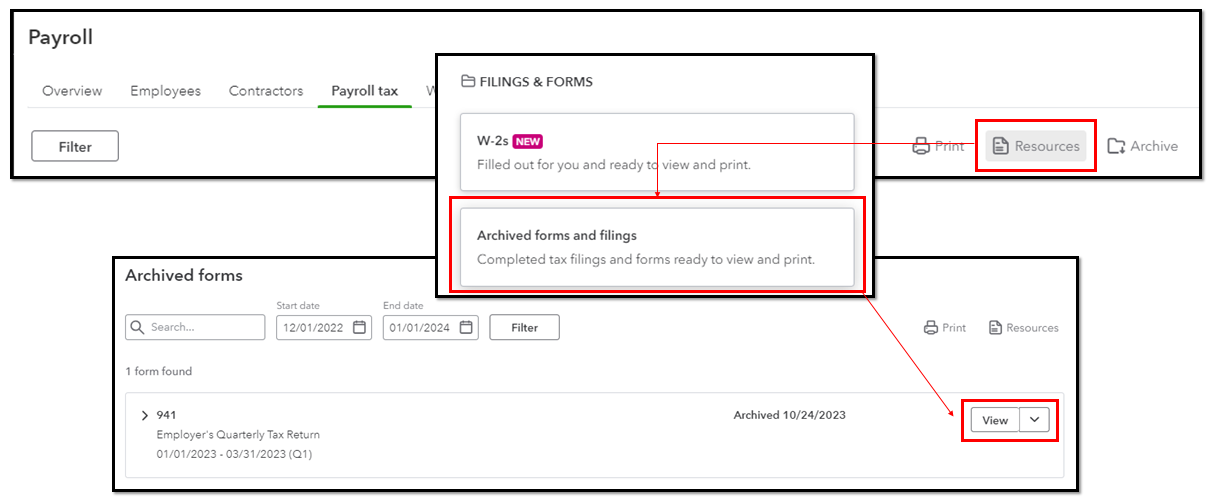
However, if you're referring to previously filed 941 forms, you can view them in the Archive section of the Payroll Tax Center. To do that:
- On the same page, click Resources.
- Select Archived forms and filings.
- Then, View.
Additionally, here's an article with a list of payroll reports you can run to view information about employees' wages, taxes, and deductions: Run payroll reports in QuickBooks Online Payroll.
Fill me in whenever you have further concerns about payroll forms. I'll be more than glad to offer additional assistance. Stay safe and have a nice day ahead!


