Hi there, Melton. Tracking your trips is crucial because it enhances accuracy, expense management, and reporting. Let's collaborate to ensure you can continue to monitor your trips, allowing you to enjoy a seamless experience moving forward.
Before we proceed, please verify that all the necessary settings are configured on your device. Ensure you have signed in as a user with admin privileges to track mileage and that your app is updated. Then, let's review the setup and check if the auto-tracking feature is turned on.
If you're using IOS:
- Open your QuickBooks mobile app.
- Click the Menu icon.
- Select All, then press Mileage.
- Choose the Auto-track your miles option.
- Follow Allow location access on-screen instructions.
If the issue persists, refer to this article for the remaining troubleshooting steps: Fix mileage tracking issues in the QuickBooks Online mobile app.
On the other hand, if you're using Android, please be aware that our engineers are currently investigating (INV-112427) an issue where the auto-track mileage feature is not working. Our dedicated team will provide updates as we work towards a resolution.
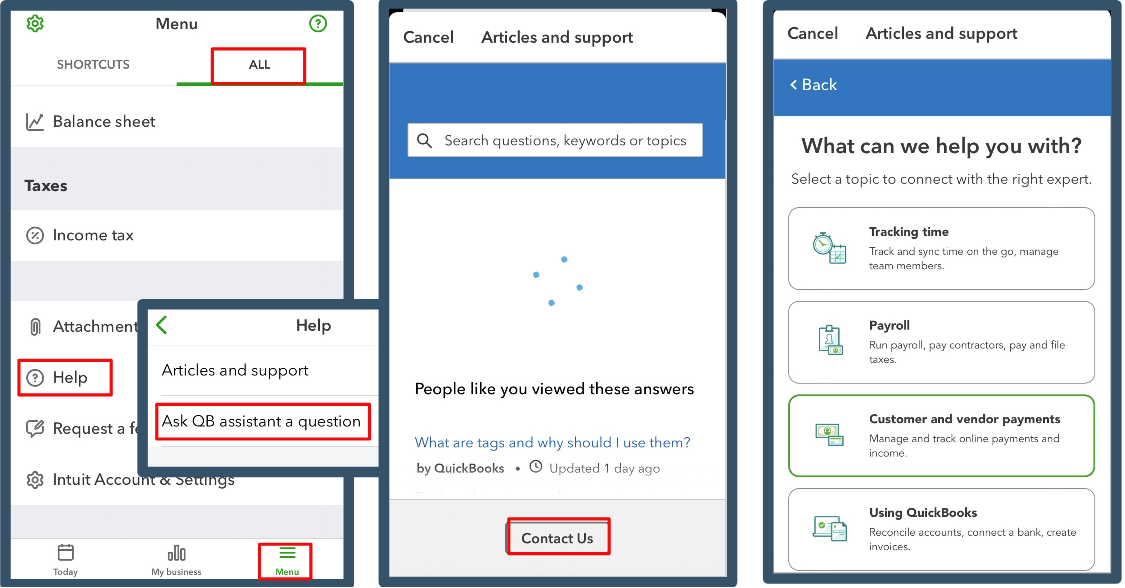
For now, I recommend contacting our Customer Care Support team to be added to the list of affected users. Here's how you can reach them:
- In your mobile app, go to the Menu.
- Click the Help icon and press ALL.
- Choose the Ask QB Assistant a question option. Select Contact Us.
- Set a specific topic or Ask about something else. Type in a short description in the box provided.
- Pick Continue, then hit the Callback option.
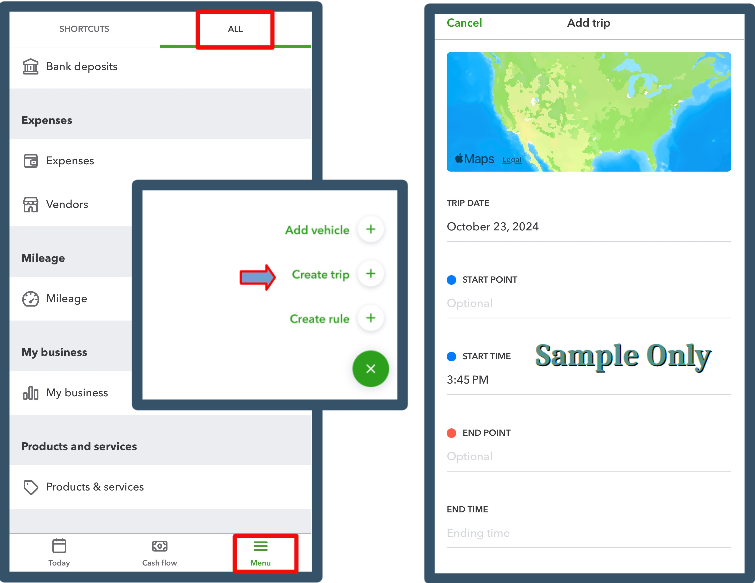
In the meantime, you can manually record your trips to help you move forward. Here's how you can do it:
- Navigate to the Menu icon. Click the Create Trip option.
- On the Add Trip page, complete the necessary details.
For future reference, if your employees use their vehicles for work, you can reimburse them for mileage. This helps ensure they are fairly paid for their expenses.
Rest assured that you can actively work on your tasks with all the information, troubleshooting steps, and workaround provided. Feel free to add any follow-up questions regarding the mileage feature. I'm still here to help.


