Turn on suggestions
Auto-suggest helps you quickly narrow down your search results by suggesting possible matches as you type.
Showing results for
Get 50% OFF QuickBooks for 3 months*
Buy nowHas anyone else had issues accessing their QB's online?
We have filed with support, called daily. Its been 6 days now and this is getting stupid. We are not the only ones so I was reaching out to see who else has been affected.
Error code=COMPANY_DISABLED
It can be challenging when you can't access your QuickBooks Online account, ALM4.
Currently, we have an ongoing investigation about being unable to log in to QBO due to the error code=COMPANY_DISABLED. Please be assured that our engineers are working diligently to resolve this problem.
We don't have a specific turnaround time on when this issue gets resolved. In the meantime, I recommend contacting our QuickBooks Support Team again to check the status. Rest assured that you'll be notified once it's been resolved. I've included the steps to contact support below.
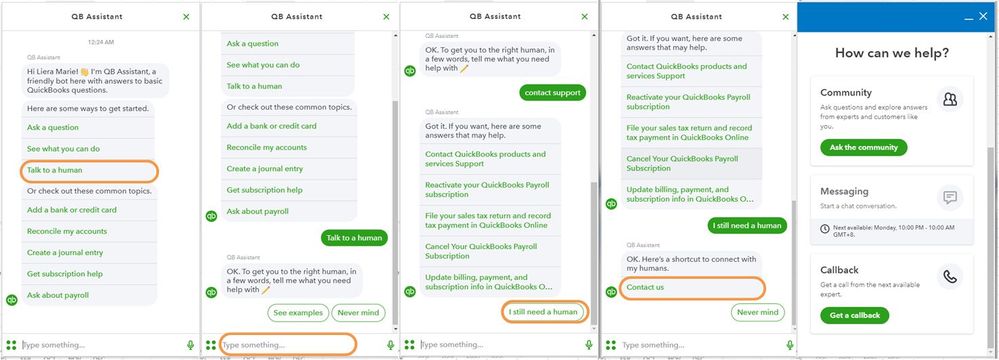
I appreciate your patience as we work through this. If you have any other concerns or questions about managing your books, please don't hesitate to add a comment below. I'll be glad to help you out.
We have a case # and an investigation# since 11/30! We are unable to close our month end or process any excess billing right now. Oddly enough, your contact support info while helpful, looks to only be possible if I could log in to QB's. Which is my issue. Is this a hack that someone has not revealed? Is this a break? I have had to call in daily since I have not had any contact or information from support. I understand things break but this not great service from your end at this time. Maybe you should consider an email at least to inform your clients that you are still looking into my issue, or anyone's issue for that matter when it lasts over 24hours. Especially if it lasts 7 days!
And to say challenging is an understatement.
We hear you, @ALM4.
Please know that this isn't the kind of service we want you to experience. Let me route you to our contact support without logging in to your QuickBooks Online (QBO) account.
You can click this link to directly reach our support and be added to the affected users of the said investigation (INV-96174): https://quickbooks.intuit.com/learn-support/en-us/contact
Once an update is available, you'll receive a notification through email.
Additionally, you might want to edit your sign-in information if you can now log in to your account, check out this article: Update or change your Intuit Account sign-in information.
Please come back if you have additional login concerns. I'll be willing to lend a hand.
Same bad experience as reported by others including user ALM4. We are unable to sign in to QBO since 11/30 and are just given lip service since without any context of what is happening and when the issue will be resolved. Not to mentions what that the status page shows green lights all the way and no incident reported since Nov 30. Obviously, that is not the truth, we have an incident number INV-96174.
Intuit, will get this solved anytime soon? How can I get a copy of our backup and restore somewhere?
This is a widespread issue and you do not seem to take ownwership neither do you communicate directly to the impacted customers. What kind of SaaS business do that nowadays?
Thanks for reaching out here today, TheLuckyJoe. I appreciate your time and understanding as we work towards resolving the error you receive when accessing your QuickBooks Online company file. I've got updates to share with you, so you can get back to business seamlessly.
I'm delighted to share that the status of the investigation created regarding the error received when signing in to the online account has already been resolved.
Our product engineers have looked into this issue where business owners like you are experiencing the same concerns and have verified the errors you receive are now being rectified. With this, you can efficiently access your QBO account.
Also, if you're using QuickBooks Online Advance, you can manually create a one-time backup to secure a backup copy of your file and restore it at any time.
However, if the issue persists on your account, I recommend contacting our Customer Care Team to further review and investigate your file. You may follow the steps provided by my colleague, CharleneMaeF above.
For future use, you can start reviewing and reconciling your accounts to make sure they always match your bank and credit card statements. Also, this validates your books are accurate and balanced when closing your month-end entries.
I want to hear more from you. If there's anything else I can help you with, just keep me posted in the comments below. I'll make sure to get you covered. Stay safe!
Glad it got fixed. I can't imagine is someone had to do payroll or pay bill during that 7-day long down time. Looks like nothing was happening until I put a post out. Why have we not been kept informed of the progress all along? Why do you guy post there are no incidents on your status page while we all know there are? You got some work to do to be a world class SaaS business.


You have clicked a link to a site outside of the QuickBooks or ProFile Communities. By clicking "Continue", you will leave the community and be taken to that site instead.
For more information visit our Security Center or to report suspicious websites you can contact us here


