Turn on suggestions
Auto-suggest helps you quickly narrow down your search results by suggesting possible matches as you type.
Showing results for
Get 50% OFF QuickBooks for 3 months*
Buy nowQBDT Pro+ 2023
Curious why when we email an invoice with an attachment, nearly half the time the response from the customer is that "there was no attachment". When I look in my "sent mail" folder, there is an attachment but somehow many customers claim there is nothing attached to what they get. Is this a known problem, or ????

Hello Deadwood Al,
Thank you for letting us know about the issue. I'm here to help you determine the problem with the attachments when emailing invoices in QuickBooks Desktop.
The issue usually happens when data damage occurs on your QuickBooks files. You can perform basic troubleshooting to isolate and resolve the problem and get back to normal as quickly as possible.
Before you proceed, start by updating QuickBooks Desktop to the latest release. Aside from improving the performance of the software, this process also fixes common and complicated errors automatically.
Here's how:
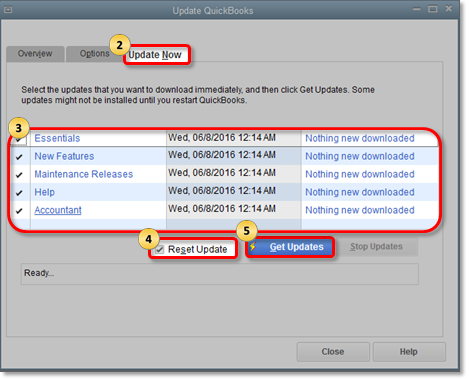
Next, let's run the Verify Data and Verify Rebuild tools. These features in QuickBooks will help self-identify data issues within a company file and self-resolve them using Rebuild Data.
To run Verify Data:
Next, please run the Rebuild Data option through these steps:
If the problem persists, reach out to our QuickBooks Support Team for further assistance. They can further check the issue and provide necessary actions if needed for the affected users.
Our Customer Support Team for Pro, Premier, plus is available from 6 AM - 6 PM PT (Monday - Friday). For Enterprise, any time, any day. See the steps to get a hold of a specialist:


We also have tools to fix common QuickBooks Desktop issues. You can check this article for more details about using the QuickBooks Tool Hub to repair QuickBooks: Fix common problems and errors with the QuickBooks Desktop Tool Hub.
Drop me a comment below if you have questions about your emailed invoices from QuickBooks. We'll be here to lend a hand. I'll be happy to help you some more.
Interesting .... just yesterday I did the update and reset all updates, also did a verify (no errors), and today was the "missing attachment". So I'm on the current release of the software, but still encountered the error. I'll go through your response again to see what else I might try. Thanks for the quick response.


You have clicked a link to a site outside of the QuickBooks or ProFile Communities. By clicking "Continue", you will leave the community and be taken to that site instead.
For more information visit our Security Center or to report suspicious websites you can contact us here


