Hi there, Patty. Let me clarify your backup options in QuickBooks Online and guide you through setting things up effectively.
When migrating from QuickBooks Desktop Pro to QuickBooks Online Advanced, the backup configuration changes, as it only uses Google Drive for direct backup integration. Unfortunately, Dropbox is not supported for automatic backups. However, you can manually transfer files to Dropbox for your accountant after saving backups to Google Drive.
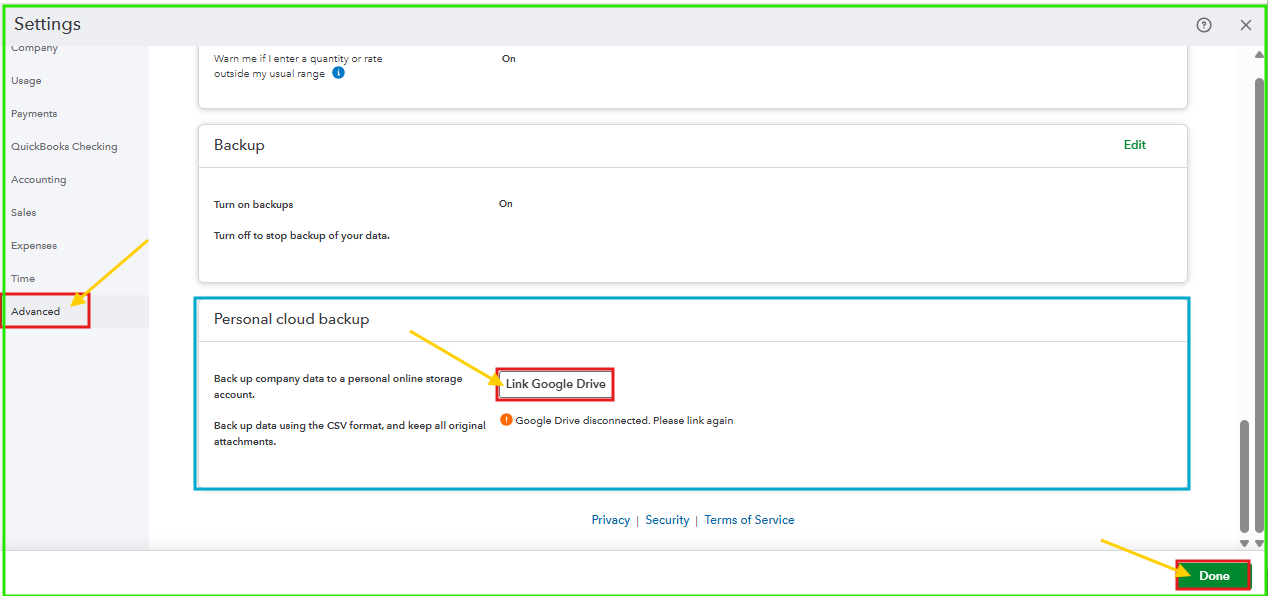
To set up Google Drive backup, follow these steps:
- Navigate to the Gear icon, then select Account and settings.
- In the Advanced tab, choose Personal cloud backup.
- Click the link to Google Drive.
- Enter the email address where you want to save your backup file. Then, select the box to agree to create files in your drive.
- Hit Done.
Once done, proceed to save your file to Google Drive. Here's how:
- Go to the Gear icon, then select Back up company.
- Select Personal cloud archive.
- Click Export Backup.
- Toggle the Google Drive radio button.
- Hit Export Backup.
Ensure backups are correctly configured and saved to your Google Drive. Once backups are complete, log in to your Google Drive account, download the backup files, and then upload them to Dropbox.
Please let us know if you have any additional questions or require further assistance. We're happy to help.


