I appreciate that you've been looking for ways how to export the CSV file of your customers, @kateseren.
The option to export a CSV file from QBO is currently unavailable. However, you can transfer data out of QBO to an Excel file. From there, you can modify the file format to a CSV file.
Here's how:
- Select the Gear icon and then choose Export data under Tools.
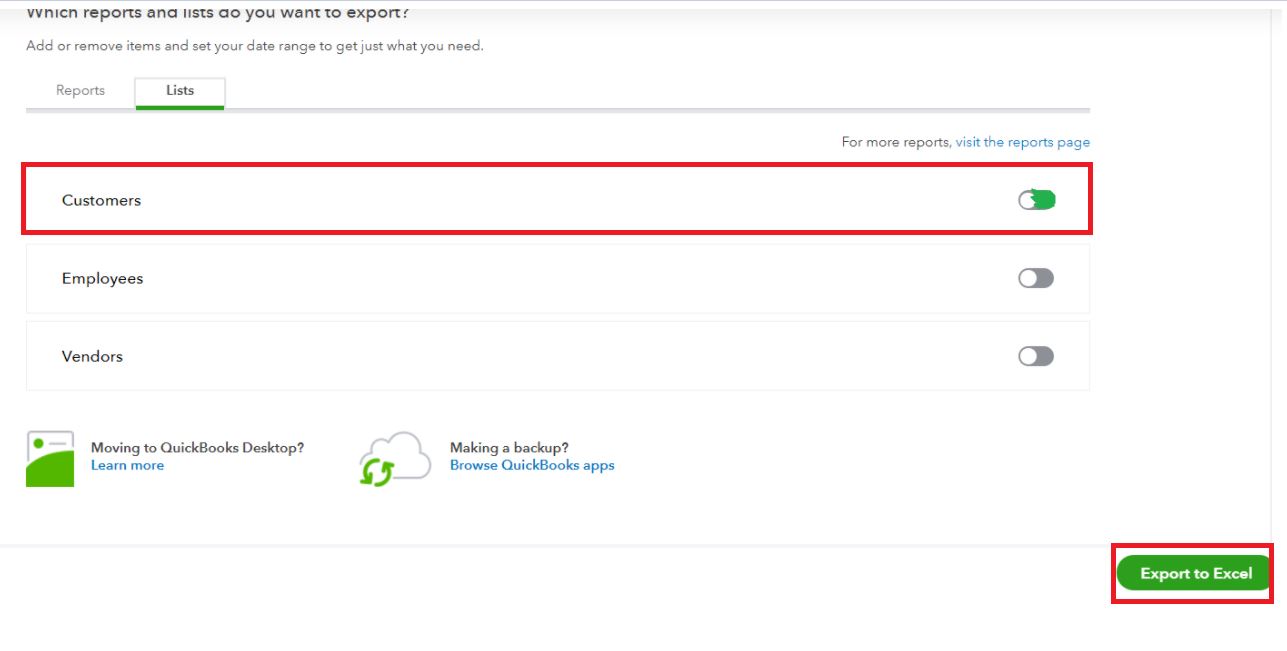
- Proceed to the Lists tab.
- Enable the Customers button.
- Click Export to Excel and choose OK.
Then, open the zip file and run the Excel file that holds a specific statement. Select Enable Editing and then follow these steps below to convert the Excel file to CSV:
- Select File and then click Save As.
- Choose Documents folder.
- In the Save as type drop-down, click CSV (Comma Delimited).
- Select Save and click Yes to confirm.

I've also added a link to check other options for exporting QBO data: Export Data out of QuickBooks Online.
Let me also attach this article to guide you on how to download your data from QuickBooks Online: Export reports, lists, and other data.
That should point you in the right direction. Don's hesitate to comment if you have other questions about exporting data. I'll be happy to help you again.




