Yes, you can enter it, sandy115. I'll be glad to help you with recording your credit card processing fees.
Before we begin, you'll need to create a service item to represent the processing fee. To do this, here's how:
- Open your QuickBooks account.
- Go to the Gear icon, then select Products and services.
- Navigate to the New button and choose Service.
- Please include all the necessary details and ensure that this service is named as credit card processing fee.
- Choose the account you want to use from the Income account dropdown.
- Once you've ensured everything is complete, click Save and Close.
After this, let's add the service item to your sales receipt. Ensure to add the processing fee as a negative value. To do so, please follow the steps below:
- Head to the + New button, then select Sales Receipt.
- Select your customer from the Customer dropdown.
- Once done, ensure to add the other details.
- For the first line item, select the product in the Product/Service column and ensure that you add the correct amount.
- On the second line, include the service fee you created and ensure that its value is negative.
- After completing this, you can click Save and Close.
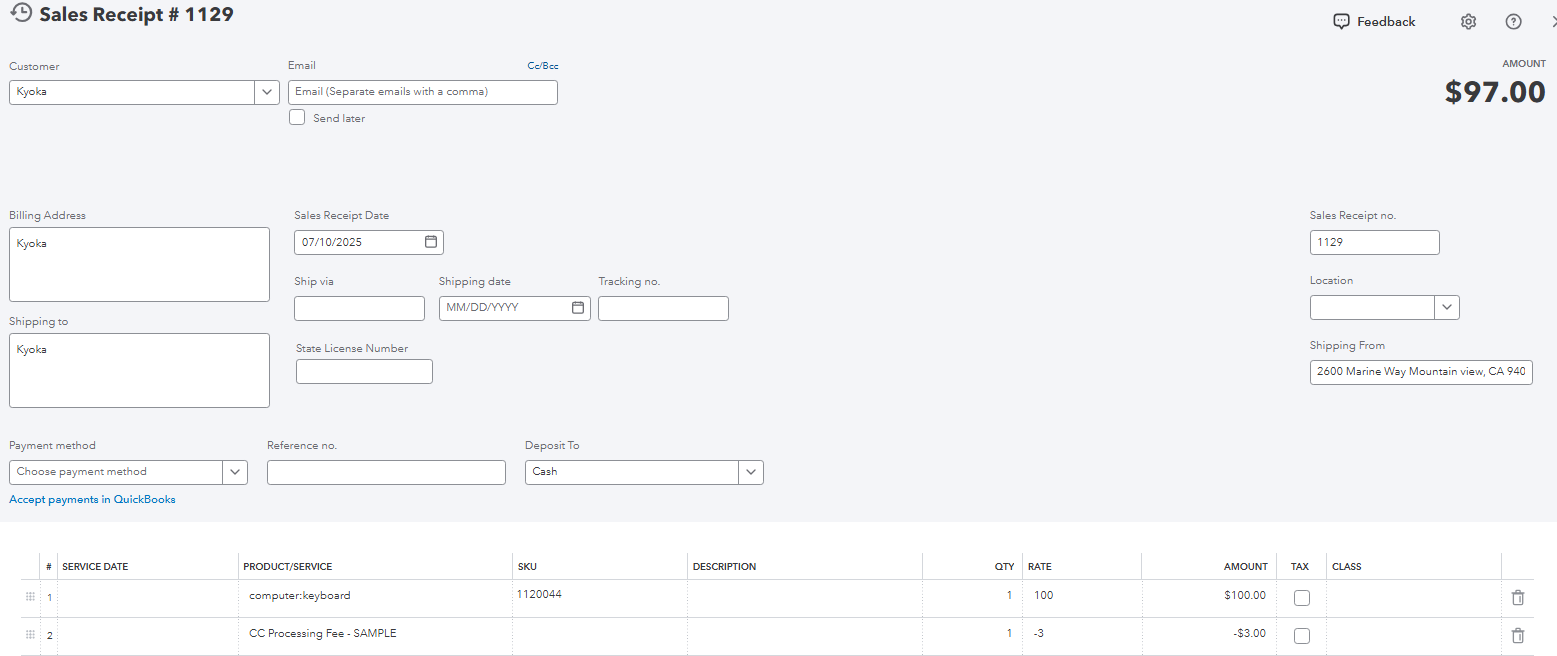
If you have other concerns about this process, feel free to comment below.


