Hi @R_Pep.
Thank you for reaching out and sharing your experience. I can absolutely understand how handling a large volume of memorized transactions manually can feel overwhelming and time-consuming. Let’s work through this together to find the best way forward.
At this time, the system requires memorized transactions to be deleted individually, since there isn’t a built-in feature to clear them in bulk. While turning off the reminder option will stop new transactions from repopulating, it does not automatically clear the existing ones.
That said, I highly encourage you to submit feedback to our product team about this suggestion, it’s an excellent idea that could improve the system and help users like yourself in similar situations. Sharing ideas directly with the team is the best way to highlight features that would make QuickBooks even more efficient.
Here's how:
- Go to the Help menu in QuickBooks.
- Select Send Feedback Online and then choose Product Suggestion.
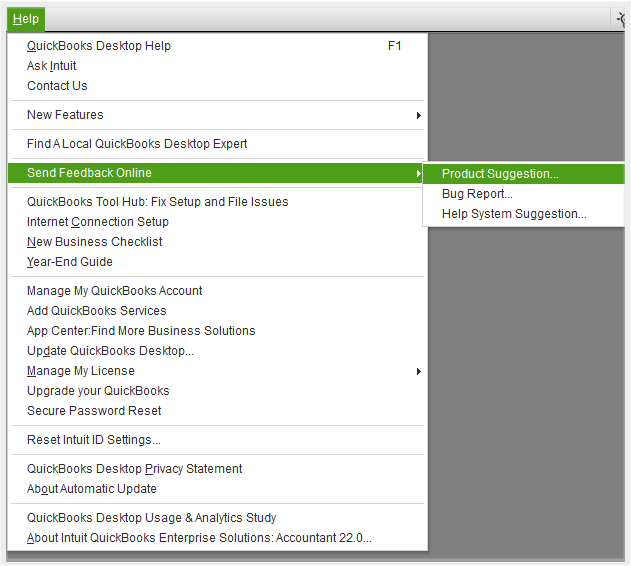
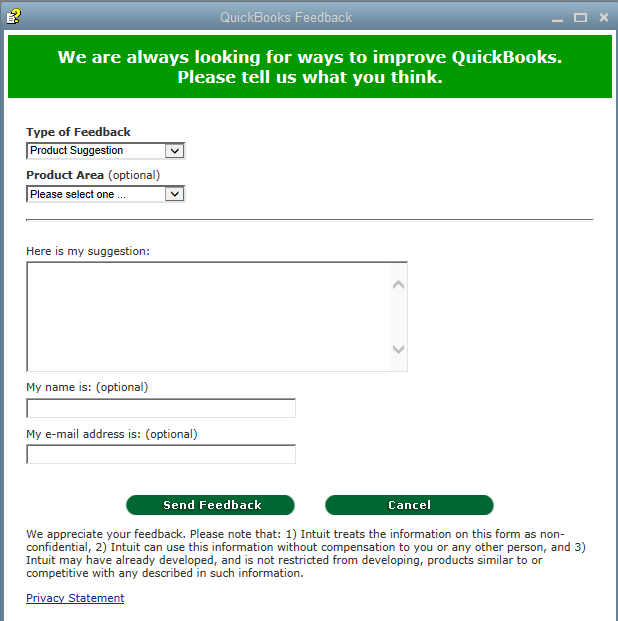
- In the pop-up window, describe your request under Here is my suggestion.
- Click Send Feedback, and your suggestion will be sent to the team.
In the meantime, if you’d like a step-by-step guide on how to delete memorized transactions, I recommend reviewing this article: Create, edit, or delete memorized transactions.
If you run into any challenges or have more questions, feel free to reply to this post or create a new one. I’m here to help whenever you need assistance. Thanks again for sharing your feedback, and I’m glad I could assist you today!



